SteamBlast Arena
Multiplayer maths and literacy game for children aged 5 to 12, with bots, teacher classes and parent controls. A client project: Sameem worked on it as a full-stack engineer.
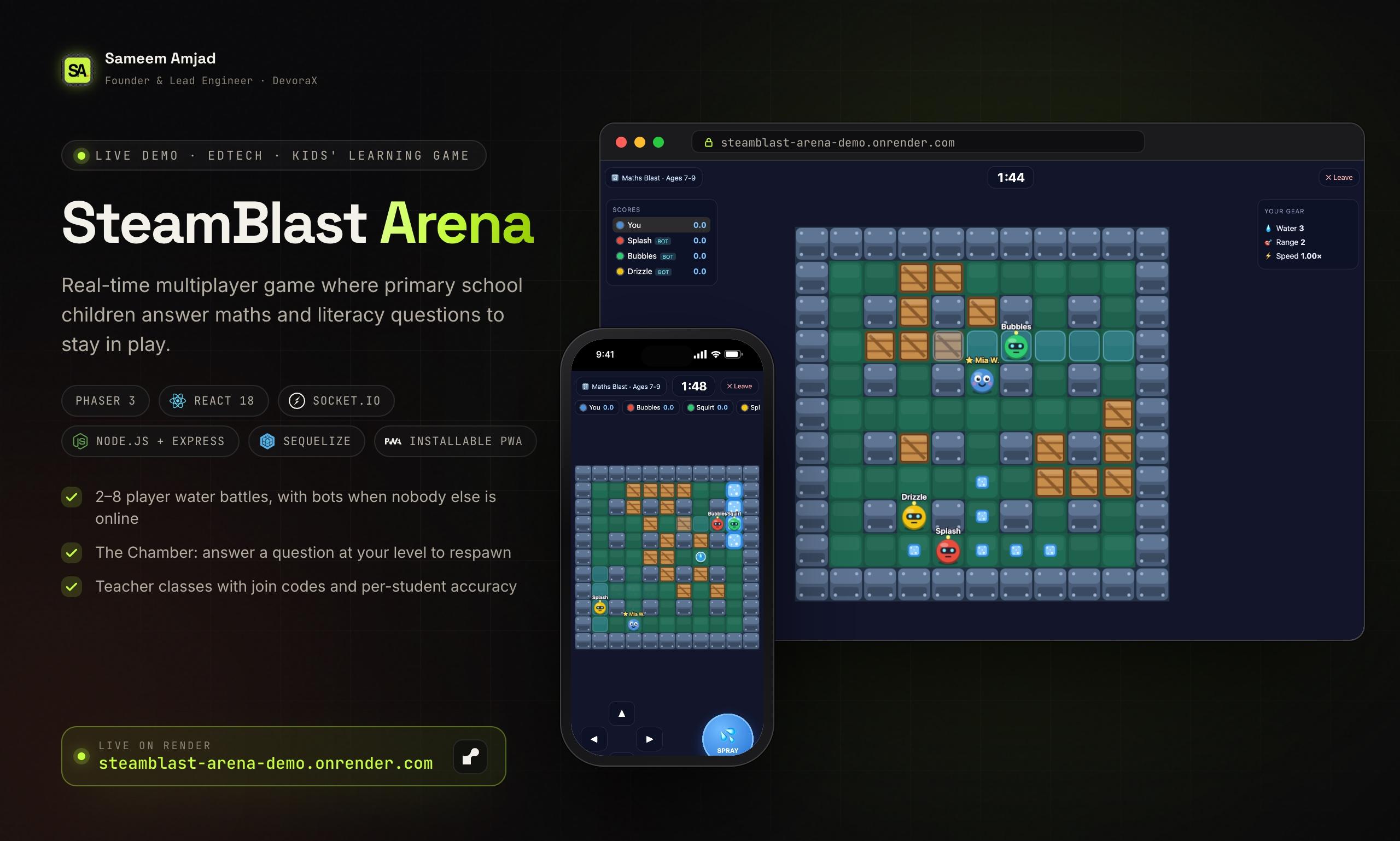
Facts about the build and who it was for. Any figure here is shown on a public store listing or site linked on this page. See how we present portfolio work.
Walkthrough
Screens
Project Story
Revision drills feel like homework, and most learning games are single-player quizzes with a game skin. The client wanted a multiplayer game that children want to play, where answering questions is the way back into the action, with premium extras for families and class tools for schools in Hong Kong.
Real-time matches for 2–8 players, run on the server over Socket.IO ten times a second, so every screen sees the same game; the Chamber, where a steamed player answers a question at their level to respawn, with a shield, a speed bonus for quick answers and streaks; bots that fill the match when nobody else is online; maths and literacy question banks for ages 5–7, 7–9 and 9–12, managed in an admin panel; teacher classes with join codes and per-student accuracy, and a parent portal with recent games and a daily time limit the server enforces; and premium extras: extra water, a custom avatar and a weekly cosmetics shop paid for with coins earned in play.
Live demo where anyone can press Play and battle bots straight away, with payments and email switched off, and a 2½-minute walkthrough recorded on it.
Project Details
SteamBlast Arena is a web game for children aged 5 to 12. Players move through a maze and spray water to turn each other into steam, and a steamed player answers a maths or literacy question at their level to get back in. Matches of 2–8 players run on the server ten times a second, bots fill a match when nobody else is online, teachers run classes with join codes, and parents see recent games and set a daily time limit. It is a client project: Sameem worked on it as a full-stack engineer, with Phaser 3 and React 18 in the browser and Node.js, Express and Socket.IO on the server. The live demo is linked from this page, with a 2½-minute walkthrough recorded on it.
Tech Stack
Where to See It
Opens the project’s page on the demo hub in a new tab, with any logins the demo needs.
Category
Phaser & Socket.IOSteamBlast Arena is a multiplayer web game for children aged 5 to 12: players spray water through a maze to turn each other into steam, and a steamed player answers a maths or literacy question in the Chamber to get back in. SteamBlast Arena is a client project: Sameem worked on it as a full-stack engineer for a client. Matches of 2–8 players run on the server ten times a second, bots fill a match when nobody else is online, and the question banks cover ages 5–7, 7–9 and 9–12. Teachers get classes with join codes and per-student accuracy; parents get recent games and a daily time limit the server enforces. A demo on sample data is at demoprojectsforclients.sameemamjad.com/projects/steamblast, and a 2½-minute walkthrough video is on this page.
What you can check
- Live demo on sample data: demoprojectsforclients.sameemamjad.com/projects/steamblast (the game and its admin panel)
- A 2½-minute walkthrough video on this page: a round against bots, the Chamber, the shop, the parent portal, the teacher dashboard and the admin panel
- In the demo, pressing Play starts a match against bots with no account needed
Each item points to something public: a store listing, a live site or a demo build. See our terms for how we present portfolio results.
What problem was SteamBlast Arena built to solve?
Revision drills feel like homework to most children, and most learning games are single-player quizzes with a game skin, where the learning and the play do not depend on each other.
The client wanted a multiplayer game that children want to play for its own sake, where answering a question is the way back into the action, with premium extras for families and class tools for schools in Hong Kong.
In SteamBlast Arena, players move through a maze and spray water to turn each other into steam. A steamed player is sent to the Chamber and answers a maths or literacy question at their level to get back in. Rounds are short, and the game runs in the browser on phones, tablets and computers.
Why does the server run every match instead of the players' devices?
Every match runs on the server over Socket.IO, ten times a second, so every screen sees the same game. A child's device sends only what the player wants to do, such as step left or spray. The server decides whether the step is allowed, where the water lands, who is steamed and whether an answer is right, and tells everyone.
This is the usual design when players affect each other in real time. If each device ran its own copy, two screens could disagree about whether a player was hit, and a modified client could report whatever it liked. Here the server limits how often each player may step according to their speed, and Chamber questions reach the device without the correct option marked.
The cost is latency, since every action makes a round trip before it counts. A grid game tolerates that well: a step moves one tile, and the client animates it briefly, so a short delay looks like ordinary movement.
How does the Chamber turn questions into the way back into the game?
Being steamed does not end a child's round. In the Chamber, the server picks a question for the match's mode at the child's level and starts a timer. A right answer brings the player back on an open tile with a shield, so they are not steamed the moment they reappear. A quick answer adds a speed bonus, and a run of right answers builds a streak worth extra points.
A wrong answer shows the correct one, then a short wait and a new question. That wait is the whole penalty, so the quickest way back is to think the question through.
Questions arrive when the child wants something, a way back in, which gives them a reason to read carefully, and each one is short enough not to stall the round. The server avoids repeating a player's recent questions and accepts one answer per question, so a child cannot try every option in turn.
How do bots keep a match going when nobody else is online?
Multiplayer games have a cold-start problem: matchmaking works only when enough players are waiting at the same moment, and a child facing an empty waiting screen soon gives up. Games with few players online usually solve this with bots.
In SteamBlast Arena, if no one joins within a few seconds, bots take the empty places and the round starts. They move away from water about to burst, take a shot when an opponent is lined up within range, spray crates that may hide power-ups and head for power-ups they can reach. A steamed bot answers Chamber questions too, getting most of them right.
The bots are built to be beaten. They decide a few times a second, slower than a child can press keys, and do not always take a good shot, so a child who plans ahead can win.
How are the question banks organised for ages 5 to 12?
The question banks cover maths and literacy at three levels: ages 5–7, 7–9 and 9–12. Maths runs from addition through fractions and measurement to percentages and early algebra; literacy covers spelling, grammar, vocabulary, parts of speech, punctuation and rhyming. Each question is short, with a handful of answers to tap, which suits a timed answer on a phone. Before a match, a child picks maths, literacy or mixed, and a level.
The banks are managed in a separate admin panel, where an administrator can browse questions, filter them by subject and level, and add new ones. The server also counts how often each question is answered, and how often correctly.
In question banks of this kind, a question most children get wrong is often badly worded or set at the wrong level, and per-question accuracy is the usual way to find it without rereading the whole bank.
How do teacher classes work?
A teacher creates a class and gets a join code, and students enter the code in the game's settings to join. On the teacher dashboard, each class shows its accuracy and a row per student with games played, accuracy and average score, plus a note naming students whose accuracy is low and who may need extra practice.
Join codes are the usual pattern in classroom tools for young children: a short code written on the board is easier for a child than an invitation email.
Per-student accuracy is what makes the game useful to a teacher. Who won a round says little about learning; how often a child answers correctly says much more, and points the teacher to the children who need help first. In the demo, the teacher account has two classes with join codes, three weeks of games and per-student accuracy.
How does the parent time limit work, and why does the server enforce it?
The parent portal shows a child's overall accuracy, the minutes played today and recent games, and lets a parent set a daily time limit in minutes. Once the limit is reached, new games cannot start until the next day; a round already under way can finish.
Where a limit is enforced matters more than how it is set. A limit kept on the device, as an app timer or a value in browser storage, lasts only until the browser data is cleared or the child picks up another device. SteamBlast Arena keeps the limit with the account on the server. When a signed-in child asks for a match, the server adds up today's finished rounds and, if the limit has been reached, replies with a friendly message instead of a match. The limit holds on every device the child signs in on.
There is also no free-text chat between players, and custom display names pass a word filter before they are saved.
How does premium work alongside free play?
Premium costs 20 HKD a month. It adds extra water, so more sprays can be out at once, a custom avatar and a weekly cosmetics shop. Shop items are paid for with coins earned in play: a signed-in player earns coins from their score at the end of each round.
Earned coins keep money out of the moment of play. The family pays for the subscription, and the child's choices inside it cost effort. The checks sit on the server: a purchase goes through only if the account is premium and has enough coins, and the item is recorded against the account, so it follows the child to any device.
Subscriptions of this kind usually run through a payment provider's hosted checkout, with the provider confirming each payment to the server directly, so the browser alone cannot mark an account as paid. In the demo, payments are switched off.
Where can you see SteamBlast Arena?
SteamBlast Arena is a client project: Sameem worked on it as a full-stack engineer for a client. The demo is a separate copy on sample data at demoprojectsforclients.sameemamjad.com/projects/steamblast, and the hub page lists the demo logins. Press Play to battle bots straight away with no account, or press Play in two windows within a few seconds to meet in the same match. Signed in, a visitor can try the premium student's shop, avatar creator and parent portal, the teacher dashboard, and the admin panel, where adding questions works and removing them is switched off.
The server sleeps when nobody is playing, so the first visit can take about a minute. Payments and email are switched off, and the demo data resets whenever the server restarts.
This page also carries a 2½-minute walkthrough: a round against bots, the Chamber, the shop, the parent portal, the teacher dashboard and the admin panel.
Why this stack
- Phaser 3: an HTML5 game framework with sprites, input and tweens built in, which draws the maze, players and water on a canvas. Each step becomes a short tween between tiles, turning the server's tile-by-tile moves into smooth motion, and the scene takes moves from the keyboard or the on-screen pad.
- React 18 + Zustand: React builds the screens around the maze, from the Chamber question to the parent portal and teacher dashboard. Zustand is a small state store that React components and the Phaser scene can both subscribe to, so one stream of server events updates the canvas and the screens around it.
- Socket.IO: a persistent two-way connection between each device and the server, with rooms that group a match's players so one message reaches all of them. It falls back to long polling where WebSockets are blocked and reconnects after brief drops, which suits children on home Wi-Fi and mobile data.
- Node.js + Express: one Node process serves the REST API and runs the Socket.IO server and its game loops. Its event loop suits a server that mostly waits on sockets, and a small shared package of game constants keeps the client and server agreed on the rules.
- Sequelize (Postgres / SQLite): an ORM that defines users, questions, game sessions, classes and shop items once, with migrations, and runs them on either database. Postgres suits the relational data, such as students in classes and players in sessions; SQLite needs no separate server.
- Installable PWA: the game can be added to a phone or tablet's home screen and open in its own window in landscape, with no app-store listing. A service worker caches the game's files, while API and game traffic always go to the server.