CEDMAT Roller Shutter App
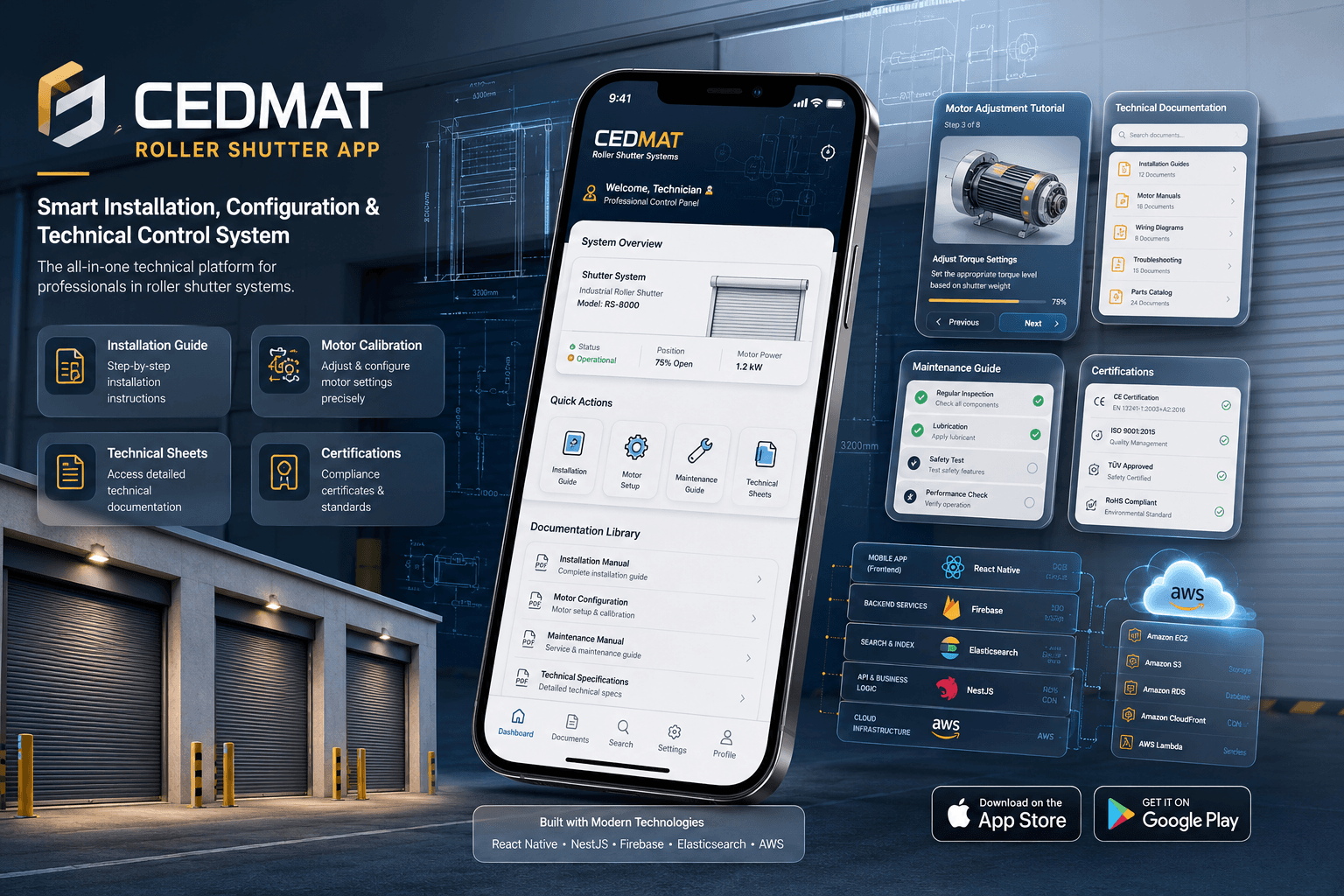
Installer app for CEDMAT roller-shutter systems: motor-calibration guides, technical documents and installation manuals in one React Native app. Live on Google Play.
Facts about the build and who it was for. Any figure here is shown on a public store listing or site linked on this page — how we present portfolio work.
Project Story
Professionals in the roller shutter industry faced challenges with the cumbersome installation processes and disparate support documentation, which hindered efficiency and accuracy.
Sameem worked on a React Native app with a NestJS backend on AWS that puts installation guides, motor-calibration tutorials and product certificates in one searchable place.
Live on Google Play (com.cedmat_app).
Project Details
The CEDMAT app gives roller-shutter installers one place for motor-calibration tutorials, installation manuals, maintenance guides and product certificates. Sameem worked on the build: a React Native app on a NestJS and Firebase backend, hosted on AWS, with Elasticsearch so technicians can search the documents. It is live on Google Play (com.cedmat_app).
Tech Stack
Where to See It
Category
React Native & AWSCEDMAT Roller Shutter App is a mobile app that gives installers of CEDMAT roller shutters one place to find installation guides, motor adjustment tutorials, technical sheets, certification documents and maintenance instructions. Sameem Amjad worked on it. It is a React Native app with a NestJS and Firebase backend on AWS, using Elasticsearch for search, and it is live on Google Play as Cedmapp, package com.cedmat_app.
What you can check
- Live on Google Play as Cedmapp: https://play.google.com/store/apps/details?id=com.cedmat_app
- Package id: com.cedmat_app
- Store listing covers: installation tutorials, motor adjustment, technical sheets, certifications, maintenance instructions
Each item points to something public: a store listing, a live site or a demo build. See our terms for how we present portfolio results.
What problem is the CEDMAT app meant to solve?
The app is aimed at two related problems in roller shutter installation: procedures that are awkward to follow on site, and support documentation spread across several sources. It is worth reading them as one problem, because in any technical trade the process and the reference material describing it are the same thing seen from different angles. A procedure only exists in the form somebody wrote it down in. When that written form is scattered, the procedure itself becomes harder to follow, not merely harder to look up. This is a general property of documentation-heavy work: the cost of dispersal is paid at the moment of use, by whoever has to decide which of several documents is the one that actually applies.
Accuracy matters here as much as speed. Slow lookup costs time, and time is recoverable. Acting on the wrong reference costs correctness, and correctness is not always recoverable once a shutter is in place. Certification documents are among the material the app holds, and wherever documentation carries that kind of weight, the question is never simply whether a document can be found, but whether the one found is the one that applies. That is why centralisation is the natural response: a single source removes the ambiguity about which copy counts, which is a structural fix rather than an editorial one.
The answer is a single mobile app with a React Native front end and a NestJS backend on AWS that brings installation guides, motor tutorials and certification documents into one place. The material itself is CEDMAT's own product documentation, as the Google Play listing presents it; the app's contribution is where that material lives and how directly an installer can reach it. That turns an editorial problem into an engineering one: getting existing material into one addressable place, and making it retrievable during the work rather than before or after it. The rest of the stack reads as a set of answers to that second half.
What does the CEDMAT app cover?
The Google Play listing describes the app as a guide to installing CEDMAT roller shutters. It covers putting the closures in place and adjusting their motors through tutorials and instructions, and it gives access to commercial documentation, technical sheets, sections, certifications and maintenance instructions. The app also carries installation manuals and motor calibration material. That list is the product's scope, and it spans several distinct kinds of reference material rather than one, which is the detail that makes the backend and search choices reasonable rather than excessive.
Two points are worth stating precisely. Certifications appear in that list as documents to consult: the listing describes access to them, not an app that issues, checks or grants a certification. And the motor material is tutorials and instructions: reference content an installer follows while adjusting a motor.
Why does a field installation tool like this suit React Native?
React Native is the front end, and the public build is the Android app on Google Play under the package com.cedmat_app. The general case for React Native in a project of this shape is straightforward. It renders real native views rather than drawing inside a web container, so scrolling, navigation and text behave the way the platform's own applications behave, which matters for anything somebody uses while doing something else with their hands. It is written in JavaScript or TypeScript against React's component model, so the interface is expressed as composable, state-driven pieces rather than imperative view controllers. For a product whose job is retrieving content, that model fits, because most of the interface ends up being a function of what the backend returns.
The second general argument is about reach and cost. One codebase targets both mobile platforms, so an iOS release becomes a decision about priorities rather than a decision to fund and staff a second client. That optionality is part of why teams pick the framework in the first place, whether or not a second platform ever ships. It also concentrates effort: one dependency tree, one set of conventions, one place where a change to a shared component takes effect. Against that sits the usual trade, which is that anything platform-specific has to cross a bridge into native code. For interfaces built mostly from lists, text and navigation, that boundary is generally not the binding constraint.
Why pair a React Native app with a NestJS backend?
NestJS is the backend framework, alongside Firebase. The general reason to choose it is that it supplies structure before a codebase is large enough to demand structure. Express and its peers leave application architecture entirely to the developer, which is fine until a service accumulates enough surface that convention stops holding. NestJS instead ships an opinionated module system with dependency injection built in, so the question of where a piece of logic belongs has a default answer rather than a standing debate. That pays off most on services spanning several unrelated concerns, and the content list here, covering installation guides, motor material, certifications, maintenance instructions and technical sheets, is exactly that kind of breadth.
Being TypeScript-first is the other general argument, and it compounds with a React Native client. Both ends of the system are JavaScript-ecosystem technologies, so the same language, the same tooling and the same type system are available on the server and in the app. A typed backend framework catches a whole category of mistake at compile time rather than at runtime, and that one language across a small stack lowers the cost of moving an engineer between its two halves. NestJS also treats validation, authentication and cross-cutting behaviour as first-class framework concepts rather than libraries bolted on afterwards, which is generally why it suits services that outgrow a handful of endpoints.
What does AWS contribute to an app like this?
The backend runs on AWS, and a managed cloud is the default choice for a product of this kind. An app whose job is serving reference material to people during work carries an availability requirement that is easy to state and expensive to meet with self-managed hardware: the material has to be there when somebody reaches for it. Managed infrastructure turns that requirement into a configuration problem rather than a procurement one. Capacity can be adjusted without a purchase cycle, and the operational floor, meaning machines, patching, networking and backups, is carried by the provider rather than by whoever runs the application.
The second general argument is breadth. A stack that includes a search engine, a custom backend service and managed backend components has several distinct infrastructure needs, and AWS supplies them under one account, one identity system and one billing relationship. That consolidation is mostly an operational convenience rather than a technical one, but operational convenience is frequently the binding constraint on a small project.
Where does Firebase fit in a NestJS and AWS backend?
Firebase sits on the backend beside NestJS. It is a bundle of managed backend services a project can adopt piecemeal instead of building and operating equivalents itself. It turns up next to a custom service so often because the two solve different halves of one problem. One holds the logic specific to the domain; the other supplies commodity pieces that every mobile product needs and none differentiates on.
That division is a cost argument more than a capability one. Every commodity component a project builds itself is a component it then owns permanently, including its failure modes, its migrations and its share of on-call work. Buying those pieces from a managed provider concentrates the custom code on the part of the system nobody else can supply, which here is everything specific to roller shutter installation and its documentation. The trade is well understood: managed services are opinionated, they are harder to migrate away from than code you wrote yourself, and their behaviour is only as observable as the provider makes it.
Why does technical documentation need Elasticsearch rather than database search?
Elasticsearch provides the app's search, so installers can look up material by what they type instead of browsing to it. It is the part of the stack tied most directly to what a user does, which makes it the most clearly motivated choice. The general reason a dedicated search engine gets added to a system that already has a backend is that databases and search engines answer different questions. A database is built to filter and join on predicates: it tells you which rows match a condition. A search engine is built around an inverted index and returns results ranked by relevance to a query, which is a different operation on a different data structure. When the input is a phrase rather than a value, and partial or approximate matches are still useful answers, ranking beats filtering, and that is the case a search engine exists to serve.
Technical reference material is a strong example of that case. The vocabulary people use to look something up rarely matches the vocabulary a document was titled with, and a fixed menu hierarchy only helps somebody who already knows where the answer was filed. Full-text engines address this with text analysis, relevance scoring and tolerance for imprecise input as standard capabilities of the category.
Where can you see the CEDMAT app?
The app is live on Google Play, listed as Cedmapp under the package com.cedmat_app (https://play.google.com/store/apps/details?id=com.cedmat_app). The listing describes it as a guide to installing CEDMAT roller shutters, with motor adjustment tutorials and instructions, commercial documentation, technical sheets, certifications and maintenance instructions. The portfolio lists no iOS or web version. Because the listing is public, anyone can install the app and check it against this page.
Sameem worked on the app: a React Native front end, a NestJS and Firebase backend on AWS, and Elasticsearch for search, a stack that suits an app whose job is putting the right document in front of an installer.
Why this stack
- React Native - the front end, shipped as the Android app on Google Play. It renders genuine native views rather than drawing inside a web container, so navigation, scrolling and text behave the way the platform's own applications do, which matters for a tool used in the middle of other work. Its component model suits an interface that is largely a function of what the backend returns. One codebase also targets both mobile platforms, so an iOS build stays a prioritisation decision rather than a second client to fund.
- NestJS - the backend framework. It supplies architectural structure by default: an opinionated module system with dependency injection built in, so where a piece of logic belongs has a default answer rather than a standing debate. That pays off on services spanning several unrelated concerns, and the content here, covering installation guides, motor tutorials, certifications, maintenance instructions and technical sheets, is that kind of breadth. Being TypeScript-first also keeps one language and one type system across a stack whose client is React Native.
- AWS - the infrastructure. The general fit is that an app serving reference material during work has to be available whenever somebody reaches for it, and managed infrastructure turns that requirement into a configuration problem rather than a procurement one. It also covers a stack with several distinct needs, a custom service, managed backend components and a search engine, under one account and one operational model.
- Firebase - it sits on the backend beside NestJS. Firebase is a bundle of managed backend services adopted piecemeal instead of built in-house, and it sits next to a custom service so often because the two split the work between them: domain-specific logic in code the project owns, commodity components bought from a provider. That concentrates engineering effort on what is specific to roller shutter installation and its documentation, at the cost of the usual managed-service trade-offs around portability and observability.
- Elasticsearch - it provides the app's search. Databases filter rows by predicate; search engines rank documents by relevance against an inverted index, and those are genuinely different operations. When the input is a phrase rather than a value, and approximate matches still answer the question, ranking beats filtering. Technical reference material is a strong general example, because lookup vocabulary rarely matches document titles and a fixed hierarchy only helps somebody who already knows where a thing was filed.