Coffee Shop Web App
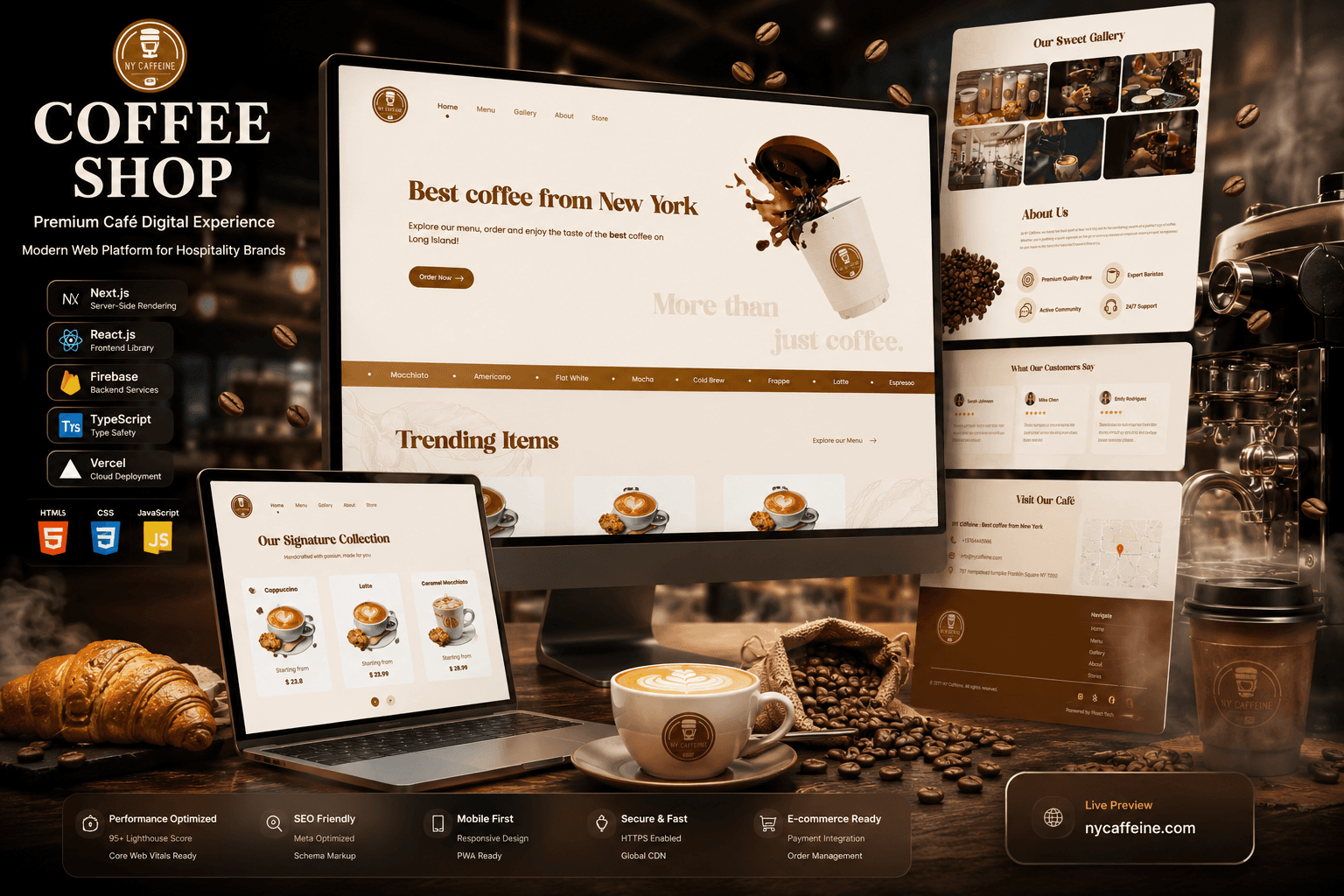
Café website on Next.js with server-side rendering: an interactive menu with prices, a gallery, store locations and online ordering. Sameem built it as an engineer at Fleact Tech.
Facts about the build and who it was for. Any figure here is shown on a public store listing or site linked on this page — how we present portfolio work.
Project Story
Coffee shops needed a modern, engaging digital solution to showcase their brand and streamline online interactions.
As an engineer at Fleact Tech, Sameem built a server-rendered Next.js site, with Firebase behind it for menu content.
You can open the build at coffee-shop-original.vercel.app.
Project Details
A café website built with Next.js and server-side rendering: an interactive menu with prices, a gallery, an about page, store locations and an Order Now flow. Sameem built it as an engineer at Fleact Tech, with Firebase for content. It is hosted on Vercel at coffee-shop-original.vercel.app.
Tech Stack
Where to See It
Category
Next.js & FirebaseCoffee Shop Web App is a café website build on Next.js and React, with an interactive menu, ordering, a photo gallery, an about section and a store-locations page. Sameem Amjad built it as an engineer at Fleact Tech. It uses Next.js server-side rendering, React for the interface and Firebase for data and content management, and it is hosted on Vercel at coffee-shop-original.vercel.app.
What you can check
- Web build on Vercel: https://coffee-shop-original.vercel.app/
- Public pages: home, menu, gallery, about and store locations
- Served as a Next.js app (visible in the page source)
Each item points to something public: a store listing, a live site or a demo build. See our terms for how we present portfolio results.
What is the Coffee Shop Web App meant to do?
A coffee shop's website has two jobs, and they pull in different directions. Showcasing a brand is a presentation job: it wants imagery, atmosphere and a page that finishes loading before a visitor loses interest. Handling online interactions is a transactional job: it wants content that stays current and an ordering path that works without a developer standing behind it. A brochure site does the first and none of the second. A generic ordering portal does the second and discards whatever makes a particular café worth visiting. This build sets out to hold both jobs on one site, and that tension is what makes it an engineering question rather than a styling one.
Holding both sets the architecture before any visual decision is made. The answer here is a server-rendered Next.js application with Firebase behind it for dynamic content. Read as a chain of consequences, that is coherent. If the site has to be found, its content needs to exist in HTML on the first request rather than after a JavaScript bundle runs, which points at server rendering. If the site has to stay current, its content cannot be markup that someone edits by hand, which points at a hosted backend. If it has to grow with the business, neither choice can depend on a server somebody keeps alive personally. Next.js and Firebase are an ordinary answer to that chain.
Why does a coffee-shop website suit server-side rendering?
Next.js is in the stack for server-side rendering, and the reasons for it are a quick first paint and visibility to search engines. Those are the same decision seen from two angles. A page assembled entirely in the browser begins life as a near-empty document, and everything a reader or a crawler wants arrives only after a JavaScript bundle has been downloaded, parsed and executed. Search engines have become better at running that code, but running it remains work they schedule rather than guarantee, and a visitor on a slow connection pays for it in blank screen time. Server rendering inverts the order. The markup is produced before the response is sent, so content is present in the first payload, readable by a crawler immediately and paintable by a browser before any application code has run. For a business that wants to be found, that ordering is the whole argument.
The second argument is about where the cost lands. Rendering on the server moves work off the visitor's device and onto infrastructure that is faster and more predictable. That trade is particularly favourable for content-led pages, where most of what a visitor needs is text and imagery that does not depend on who they are. Next.js also keeps the option open rather than forcing it: the same framework supports rendering ahead of time, rendering per request and rendering in the browser, chosen route by route as requirements change. Anyone can check that the public pages arrive with their menu and text already in the HTML: it is visible in the page source.
Where does React fit alongside Next.js on this build?
React powers the interface, and keeping it distinct from Next.js is useful because the two answer different questions. Next.js decides when and where HTML is produced and how a request is served. React decides how the interface is described and what happens once it is on screen. On a site that is mostly content, the second job is smaller than in an application, but it is not absent. The build includes an interactive menu, customer testimonials and integrated e-commerce, and the public pages show a carousel of menu items with prices and an Order Now button. Interactivity of any kind has to live somewhere. Expressing it as components gives each piece a boundary, its own state and a single place to change, rather than scripts attached to markup that nobody can safely refactor a year later.
The property that matters most in a Next.js and React pairing is that one component tree serves both sides of the request. The same code produces the HTML on the server and then takes over in the browser, so an element of the interface has one implementation rather than a server template plus a matching client widget that drift apart the first time a detail changes. That removes a whole class of bug which older architectures generated constantly, where the rendered page and the interactive page quietly disagreed. It also keeps one language and one mental model across the entire front end. That is why the combination suits a content site that also has to do something.
What does Firebase manage behind the site?
Firebase is the backend, handling data and dynamic content management. The word doing the work there is dynamic. Dynamic content is data the running site reads, not text compiled into the pages at the moment they were built. That distinction decides how a site behaves over its life. When content lives in the build, every change is a code change, which means a developer, a commit, a deployment and a wait. When content lives in a hosted store, the site reads the current value and the change takes effect without a release. For a small business, the second model is the difference between a site that reflects the shop and a site that slowly stops being true.
Choosing a managed backend rather than a self-hosted one is a staffing decision as much as a technical one. A hosted platform provides the data layer, the SDKs and the operational work behind them, which means nobody has to patch an operating system, plan capacity, configure backups or be on call for a database. That overhead is roughly constant regardless of how small the application is, so it falls hardest on exactly the kind of project this one is. Firebase offers client libraries for a React front end and an Admin SDK for server code, so a Next.js site can read content either in the browser or while rendering on the server.
Why keep the menu and online ordering on one data layer?
The build's features include an interactive menu, customer testimonials and integrated e-commerce. The general engineering argument for grouping them behind one backend is consistency. A menu that lives in markup is accurate on the day it ships and drifts afterwards, and a menu that disagrees with the counter costs more trust than a slow page ever will. The same logic applies more sharply once ordering enters the picture, because a listing and a checkout are two places the same information gets displayed. Where both read from one store they cannot contradict each other; where they are maintained separately they eventually will, and the failure surfaces in front of a paying customer. That is the structural case for putting catalogue content and the transaction path on a shared data layer.
Testimonials sit in the same category for a less obvious reason. Social proof works only while it is maintained, and content that nobody can update without a developer tends to freeze in place. Treating it as data rather than markup keeps the cost of changing it low, which is the same argument the menu makes.
What makes a café website search-friendly and mobile responsive?
The build is designed for search visibility and for mobile screens. Taking search first: optimising for it is only worth doing when a business treats its website as an acquisition channel and not only as a shop window. Server-rendered HTML is the foundation, because it guarantees a crawler receives content rather than a shell it may or may not choose to execute. Beyond delivery, the effective levers are the unglamorous ones: a coherent heading structure, descriptive titles and metadata, clean URLs, meaningful alternative text on imagery, and pages that load quickly. Next.js gives a project the routing and metadata primitives to do that work without fighting the framework, which is why it is a common choice where search matters.
Responsiveness deserves to be treated as an engineering constraint rather than a stylesheet detail. A layout that adapts is the visible part. The invisible part is that everything shipped to a small screen crosses a network nobody on the project controls, so image sizing and format, font loading and the amount of JavaScript required before a page becomes usable shape the experience at least as much as the breakpoints do. Touch input imposes its own requirements on target size and spacing, and an ordering flow has to stay completable without a mouse.
Where can you see the Coffee Shop Web App?
The build is live on Vercel at https://coffee-shop-original.vercel.app/. The public pages show a home page with an Order Now call to action, a carousel of menu items with prices, a gallery, an about section and a store-locations page with opening hours and a map. The portfolio lists no Android or iOS release, so the browser is the only client the architecture has to serve.
The browser is also a defensible target for work of this shape. An installation is a step between a person and a page, and the web removes it: a link opens immediately, can be shared, and is the thing a search result, a map listing or a printed code can actually point at. There is one codebase and one deployment rather than a site plus two store submissions, no review queue between a change and its audience, and the same server-rendered pages that serve a visitor also serve a crawler. If a native client were ever wanted, a backend already holding the content is the part that would carry over.
Why this stack
- Next.js - it is in the stack for server-side rendering, a quick first paint and visibility to search engines, and those three are one decision. Producing HTML before the response is sent means a crawler reads content on the first request and a browser can paint before any application code executes, which is the ordinary route to both discoverability and perceived speed on a content-led site; the public pages do arrive with their content in the HTML. It also keeps rendering strategy a per-route choice rather than a framework-wide commitment, so the site can change its mind later.
- React - it powers the interface. The component model gives each interactive piece, such as the menu carousel, a boundary and its own state instead of scripts bolted onto markup, which is what keeps a front end changeable after launch. Paired with Next.js, the same component tree produces the server HTML and then takes over in the browser, so an element of the interface has one implementation rather than a server template and a client widget that drift apart.
- Firebase - it handles the backend data and the dynamic content. That is the right shape when content has to change without a rebuild and a redeploy, because content read at runtime from a hosted store stops every edit from becoming a developer ticket. A managed platform also removes the operational work, the patching, capacity planning, backups and on-call, which costs roughly the same whether an application is large or small.