SiteWrite
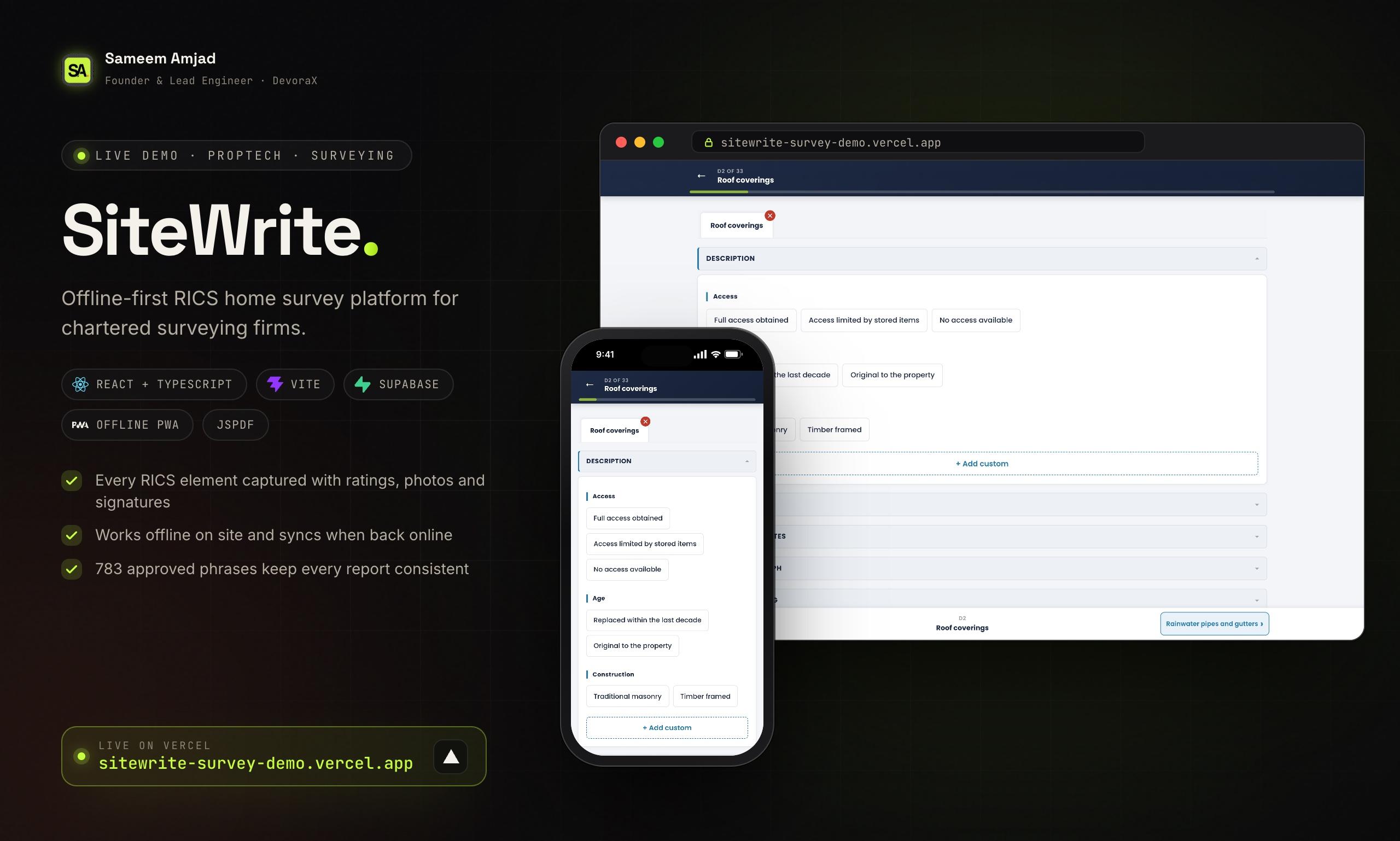
Offline-first RICS home survey platform for surveying firms: a surveyor app that works without signal and a firm admin portal. A demo build with sample data, built by Sameem as the full-stack engineer.
Facts about the build and who it was for. Any figure here is shown on a public store listing or site linked on this page. See how we present portfolio work.
Walkthrough
Screens
Project Story
Surveyors often have no connection on site and rewrite their notes into RICS Home Survey reports afterwards. Firms struggle to keep wording consistent and branded across every surveyor.
The surveyor app captures every RICS element (D–J) with condition ratings, photos and signatures, works fully offline and syncs when back online, draws on a library of 783 approved phrases, and produces a branded PDF report in one click. The firm admin portal edits the phrase library, report templates and team, and each firm’s data is isolated from every other firm’s.
Live demo on sample data: the surveyor app and the firm admin app, with a 2-minute walkthrough recorded on it.
Project Details
SiteWrite is two apps for chartered surveying firms: a tablet-friendly surveyor app that works without signal on site, and a firm admin portal that controls wording, templates and the team. It is a demo build with sample data. Sameem built it as the full-stack engineer, in React and TypeScript on Vite, with Supabase, an offline PWA layer (Workbox and IndexedDB) and jsPDF for the reports. The live demo is linked from this page, with a 2-minute walkthrough recorded on it.
Tech Stack
Where to See It
Opens the project’s page on the demo hub in a new tab, with any logins the demo needs.
Category
React PWA Demo BuildSiteWrite is an offline-first RICS home survey platform for chartered surveying firms: a tablet-friendly surveyor app that works without signal on site, and a firm admin portal that controls wording, report templates and the team. It is a demo build with sample data: Sameem built it as the full-stack engineer. The surveyor app captures the RICS Home Survey elements D–J with condition ratings, photos and signatures, draws on 783 approved phrases, syncs when back online and produces a branded PDF report in one click. Both apps can be tried at demoprojectsforclients.sameemamjad.com/projects/sitewrite, and a 2-minute walkthrough recorded on the live demo is on this page.
What you can check
- Live demo on sample data: demoprojectsforclients.sameemamjad.com/projects/sitewrite (surveyor app and firm admin app)
- A 2-minute walkthrough video on this page, recorded on the live demo
- The demo's phrase library holds 783 approved phrases
Each item points to something public: a store listing, a live site or a demo build. See our terms for how we present portfolio results.
What problem was SiteWrite built to solve?
Surveyors often have no connection on site, so the notes taken during an inspection are rewritten into a RICS Home Survey report afterwards. Every finding is handled twice, the second time away from the property, where nothing can be checked again.
Firms have a second problem, which grows with each surveyor. Every surveyor develops a personal way of describing a roof covering or advising on damp, so the same firm's reports read differently depending on who wrote them, and keeping the wording consistent and branded becomes an editing job of its own.
SiteWrite answers both with two apps. A tablet-friendly surveyor app works without signal on site, so the report is built during the inspection rather than reconstructed after it. A firm admin portal controls the wording, the report templates and the team, so the firm decides once how its reports read and look.
Why does an offline-first PWA suit surveyors on site?
Most web apps treat the network as the normal case and being offline as an error. For a surveyor that is backwards: the inspection is the part most likely to happen out of signal, and it is also where the data is created. An app that needs a connection to save a rating fails when it is needed most. SiteWrite's surveyor app works fully offline and syncs automatically when back online.
A progressive web app is a practical way to deliver that. It runs in the tablet's browser, can be installed to the home screen, is a single codebase rather than separate native apps, and updates without an app-store review. The trade-off is that the browser sets the rules: storage limits and background behaviour vary between browsers, and Safari on iPad is usually the strictest, so an offline-first PWA has to be designed around those limits from the start.
What does offline-first mean for how the app is put together?
Offline-first systems usually have three parts. The first is the app shell, the files the app needs to start, which a service worker caches so the app opens with no network. In SiteWrite's stack the service worker comes from Workbox, which can build its precache list from the build output and track each file's revision, so a new deployment replaces cached files cleanly.
The second is local-first writes. In an offline-first app, ratings, notes, photos and signatures are saved first to a store on the device, in this stack IndexedDB, and the interface reads from that copy, so saving never waits on a server. The third is a sync step that sends offline changes up and brings newer data down when the connection returns.
Sync is where the hard questions live. What if a survey is edited on two devices, or a template changes while a surveyor is offline? Should the later write win, or should changes merge field by field? Large photos are best uploaded separately, and because browsers can evict stored data under pressure, offline-first apps usually request persistent storage.
How does the surveyor app capture a RICS Home Survey?
The surveyor app captures every RICS Home Survey element, D–J, each with a condition rating, alongside photos and signatures. RICS Home Survey reports use condition ratings to tell the reader how serious a defect is, from no repair currently needed, through repairs that are not urgent, to defects that are serious or urgent, with a separate marker for parts not inspected. Capturing the rating as structured data against its element, rather than as a sentence in prose, is what lets a report be assembled from the survey instead of retyped from it.
On a tablet, choosing and tapping should do most of the work. Photos are the heaviest data, and offline apps usually resize them on the device so a full survey does not exhaust browser storage. Signatures are typically drawn on the touchscreen and kept as images.
SiteWrite claims no RICS endorsement or accreditation.
How does a phrase library keep wording consistent across surveyors?
SiteWrite's phrase library holds 783 approved phrases covering descriptions, construction, condition and advice. Surveyors draw on it while writing up, and it is edited in the firm admin portal.
The case for a library is consistency more than speed. A buyer reads a survey to decide on a property, and two descriptions of the same defect can point to different conclusions. When every surveyor draws on the same approved wording, reports read as the firm's work rather than the individual's, and improving a phrase improves every report written after it.
Two design questions follow. The library is needed most where there is no signal, so it belongs in the offline data alongside the surveys. And edits should not rewrite history: the usual approach in tools of this kind is to copy a phrase's text into the survey when it is chosen, so a later edit changes future reports without altering one already written.
How does SiteWrite produce a branded PDF report in the browser?
The finished report is a branded PDF produced in one click with jsPDF, a JavaScript library that builds PDF files in the browser. Generating on the device needs no server round trip, so producing a document does not depend on a connection or a rendering service.
The trade-off is that jsPDF is a drawing API rather than a layout engine. A headless browser lets HTML flow across pages on its own; jsPDF places text and images at coordinates, so the generator has to wrap text, break pages and keep headings with what follows them. That is more work up front, but the output is predictable, which suits a report whose structure is fixed by the survey elements. Photos are the practical limit, so generators of this kind usually scale images down to print size before embedding them.
What does the firm admin portal control?
The firm admin portal is the second app. It holds the phrase library editor, report templates and team management: the decisions a firm makes once and wants every surveyor to inherit, including how its reports look. Splitting it from the surveyor app reflects two different jobs. The surveyor app is a field tool that has to start with no signal; the portal is a desk tool for whoever runs the firm's standards.
A field app's offline cache only has to hold what the field needs, which keeps it smaller and quicker to update. Permissions become clearer too, because the people who may change a firm's approved wording are a smaller group than the people who use it. And in systems of this shape, a phrase edited at the desk reaches surveyors' tablets when they next sync, so sync has to carry the firm's reference data as well as the surveys.
How are surveying firms kept apart from each other?
SiteWrite is multi-tenant: many firms on one system, with each firm's data isolated from every other firm's. For surveying firms that is the baseline, since surveys hold addresses, photographs of homes and professional judgements.
The general rule is to enforce isolation as close to the data as possible, so a forgotten filter on one screen cannot expose another firm's records. Supabase is built on Postgres, where the usual way to do that is row-level security: each row carries the firm it belongs to, and database policies check it against the signed-in person's firm on every query, whichever app sent it. File storage can be scoped the same way.
Offline-first adds a wrinkle that server rules cannot cover. Data cached on a tablet sits outside the database, so offline apps generally scope local data to the signed-in surveyor and clear it on sign-out. DevoraX holds no security or compliance certifications.
Where can you see SiteWrite?
SiteWrite has no live product. It is a demo build, and the surveys and the firm in it are sample data. Both apps, the surveyor app and the firm admin app, can be tried from the demo hub at demoprojectsforclients.sameemamjad.com/projects/sitewrite, and the hub page lists the demo logins. In the surveyor app a visitor can work through the survey elements, condition ratings and phrases; in the firm admin app, the phrase library editor, report templates and team management. The AI writing assistant is switched off in this demo.
This page also carries a 2-minute walkthrough recorded on the live demo. It shows the surveyor app, the branded report and the firm admin app, following the path from a survey to the finished PDF and the controls a firm uses behind it.
Why this stack
- React + TypeScript: a survey is a large, nested form that must stay consistent as a surveyor moves between elements. Declarative rendering keeps each screen a function of the survey's state, and components let the same rating and photo controls repeat across every element. TypeScript matters most in the survey's data model, which storage, sync and the PDF generator all rely on, so a changed field becomes a compile error rather than a missing section.
- Vite: the build tool and development server. For an offline PWA the build output matters: Vite emits content-hashed files, which is what a service worker's precache needs to tell changed files from unchanged ones, so an update replaces only what changed on a tablet. Its plugin ecosystem also includes Workbox-based PWA tooling that generates the service worker from the build.
- Supabase: Postgres, authentication, file storage and an API in one managed platform. Survey data is relational, with firms, surveyors, surveys, phrases and templates referring to one another, and Postgres expresses that with keys and constraints. It also suits multi-tenancy, because Postgres row-level security lets isolation between firms be enforced in the database itself rather than in each app's queries, and its file storage can hold photos and reports under the same access rules as the data.
- Offline PWA (Workbox + IndexedDB): the pair that makes working without signal possible in a browser. Workbox turns the error-prone parts of a service worker, precaching, cache versioning and caching strategies, into configuration, so the app shell loads with no network. IndexedDB is the browser's database for structured data and binary blobs, with far more room than localStorage, which suits surveys and photos that must survive until they sync.
- jsPDF: builds the branded report in the browser from data already on the device, removing a server dependency at the moment a surveyor wants a finished document. The cost is that it draws at coordinates rather than flowing HTML, so wrapping and page breaks are the generator's job; for a fixed report structure, that predictability is an advantage rather than a burden.