Pianissimo Online
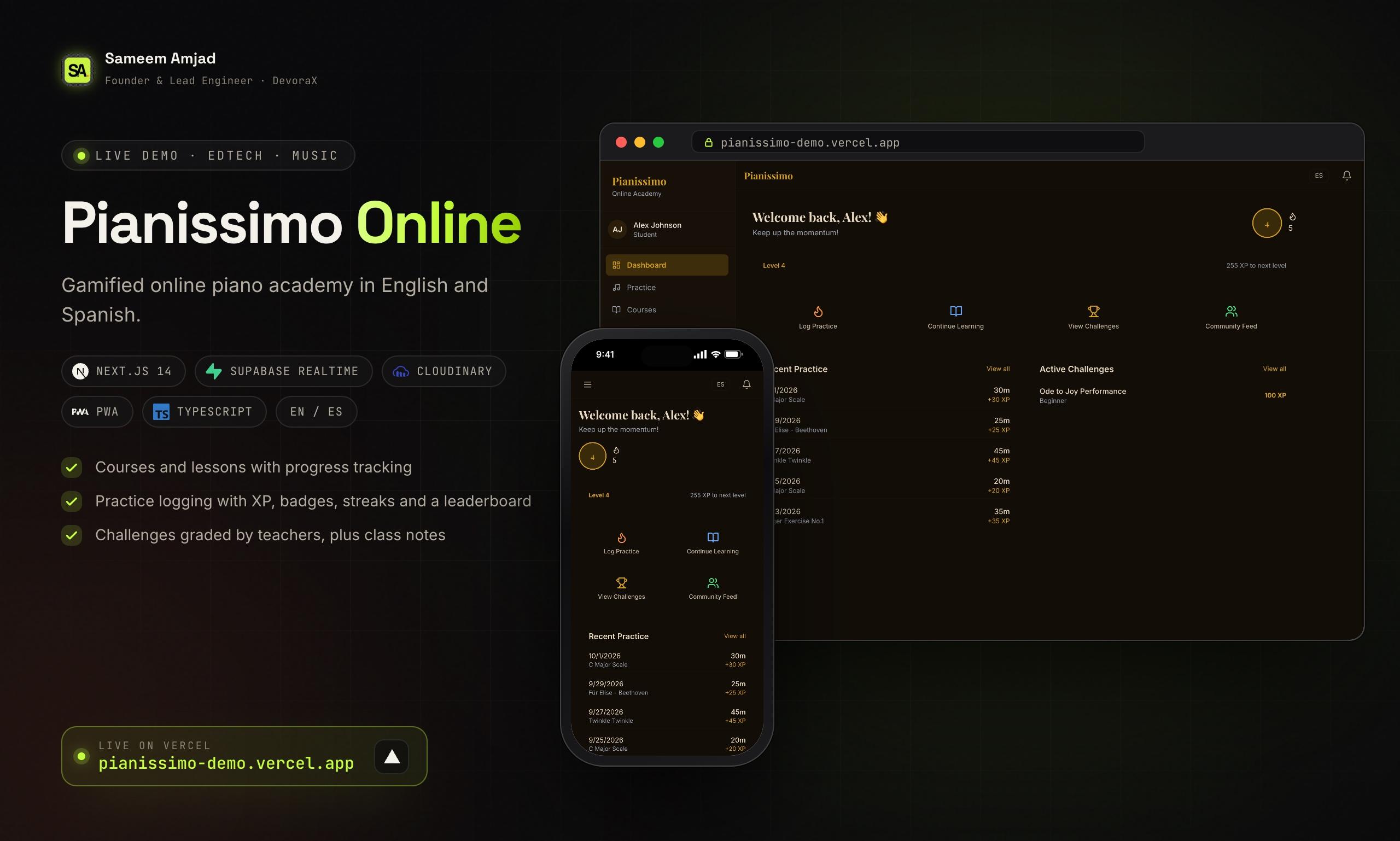
Gamified online piano academy in English and Spanish: courses, practice tracking with XP and badges, teacher feedback and a student community. A client hired DevoraX through its Fiverr profile, which is in Sameem's name, and Sameem built it as the full-stack engineer.
Facts about the build and who it was for. Any figure here is shown on a public store listing or site linked on this page. See how we present portfolio work.
Walkthrough
Screens
Project Story
Online piano students lose motivation between lessons, teachers can’t see who is actually practising, and lessons, feedback and community end up spread across different tools.
Courses and lessons with progress tracking; practice logging that earns XP, levels, badges, streaks and a place on a leaderboard; challenges that teachers grade, with class notes for each student; a community feed with posts, polls and reactions, plus direct messages; real-time notifications; and an admin area for students, analytics, moderation and invites.
Live demo on sample data in English and Spanish, with a 2-minute walkthrough recorded on it.
Project Details
Pianissimo Online is an installable web app for an online piano school: structured courses, practice tracking with XP and badges, teacher feedback, and a student community, in English and Spanish. A client hired DevoraX through its Fiverr profile, which is in Sameem's name, and Sameem built it as the full-stack engineer, on Next.js 14 with Supabase Realtime, Cloudinary for media and next-intl for the two languages, and it installs to the home screen as a PWA. The live demo runs on sample data and is linked from this page, with a 2-minute walkthrough recorded on it.
Tech Stack
Where to See It
Opens the project’s page on the demo hub in a new tab, with any logins the demo needs.
Category
Next.js & SupabasePianissimo Online is an installable web app for an online piano school, in English and Spanish: structured courses, practice tracking with XP and badges, teacher feedback and a student community. A client hired DevoraX through its Fiverr profile, which is in Sameem's name, and Sameem built it as the full-stack engineer. Logging practice earns XP, levels, badges, streaks and a place on a leaderboard, teachers grade challenges and keep class notes, and it runs on Next.js 14, Supabase Realtime, Cloudinary and next-intl. The product has no public link, but the demo at demoprojectsforclients.sameemamjad.com/projects/pianissimo runs on sample data, and the 2-minute walkthrough video on this page was recorded on it.
What you can check
- Live demo on sample data, in English and Spanish: demoprojectsforclients.sameemamjad.com/projects/pianissimo (the hub page lists the demo logins)
- A 2-minute walkthrough video on this page, recorded on the live demo
Each item points to something public: a store listing, a live site or a demo build. See our terms for how we present portfolio results.
What problem was Pianissimo Online built to solve?
Pianissimo Online is an installable web app for an online piano school, built around three problems of teaching piano at a distance. Students lose motivation between lessons. Teachers cannot see who is actually practising. And lessons, feedback and community end up spread across different tools.
The first two are one problem seen from two sides. Progress on the piano is made between lessons, in practice nobody watches. Pianissimo Online's answer is to make practice visible and rewarding at once: logging practice earns XP, levels, badges, streaks and a place on a leaderboard, and teachers grade challenges and keep class notes for each student.
The third is consolidation. Courses and lessons with progress tracking, a community feed, direct messages, real-time notifications and an admin area sit in one bilingual app, so the place a student practises from is also where feedback arrives and where the school talks.
Why is gamification a data-design problem?
XP, levels, badges, streaks and a leaderboard look like interface features, but each is a question asked of the practice history. In Pianissimo Online, logging practice earns XP, which feeds everything else, so a flaw in how practice is recorded shows up everywhere at once.
The central choice in systems of this kind is between storing events and storing totals. A running total is cheap to read but cannot explain itself: if a log is edited, deleted or submitted twice, the total drifts and there is nothing to rebuild it from. The usual answer is a log of practice events, with totals and levels derived from it, or cached beside it and recomputable when a rule changes. Badges become rules over that history, and the leaderboard becomes a ranking query.
Streaks add the calendar, and a day is a local idea: a student practising late in the evening may already be on the next day in UTC. The common approach stores timestamps in UTC and assigns each session to a day in the student's own time zone, so a streak breaks at the student's midnight, not the server's.
What do teacher-graded challenges and class notes add?
XP measures activity, not quality, so the teacher's side of the problem needs more than points. Pianissimo Online gives teachers challenges to grade and class notes for each student. Practice logging puts time at the piano on record; grading judges how well the work was done.
Grading changes the shape of the data. A logged session is the student's own claim, while a graded challenge moves through stages: attempted, waiting for a teacher, then graded with feedback. Systems of this kind usually model that as a submission with an explicit status, so a teacher's queue is simply the submissions still waiting, and a grade belongs to one submission rather than floating free. Class notes belong to one student and are written by a teacher, and who may read them is an access rule the data model has to settle before any screen is drawn.
What does a community feed with polls and direct messages have to handle?
Community is where online schools most often reach outside the product, to a group chat or a social page. Pianissimo Online brings it inside: a feed with posts, polls and reactions, plus direct messages.
Each carries its own rule. A reaction is usually limited to one per person per post, which is why counts in systems like this are generally derived from the reactions themselves rather than incremented blindly, where a double tap or a retried request would inflate them. A poll needs one vote per member and results that change as votes arrive. Direct messages differ in kind: a post is published to the school, while a conversation belongs to its participants, so who may read a message has to be decided where the data is stored, not only in the interface. Keeping all of it in the school's own app also puts it within reach of the moderation tools in the admin area.
How do real-time notifications work over Supabase Realtime?
Most events in a product like this concern someone other than the person who caused them: a grade concerns a student, a message its recipient, a reaction the author of a post. Pianissimo Online delivers notifications in real time over Supabase Realtime.
Supabase is built on Postgres, and its Realtime service lets a browser subscribe to database changes, or to messages broadcast on a channel, over a persistent WebSocket connection. That replaces polling, where every open tab asks the server on a timer whether anything has happened, with a push the moment something does.
The usual design treats notifications as stored data first and live events second: the notification is written to the database, and the channel tells an open screen that it exists. Connections drop and phones sleep, so a student who was away when a challenge was graded should still find the notification on returning.
Why is it an installable web app rather than separate native apps?
Pianissimo Online is a progressive web app: it installs to the home screen and opens like an app, while staying one Next.js 14 codebase served from the web. For students on phones, tablets and laptops, that is a practical trade. One build covers every device, and updates go out with each deployment rather than waiting for app-store review.
Installability generally rests on two pieces: a web app manifest, which supplies the name, icons and standalone window, and a service worker, which can cache the app shell so it opens quickly on a weak connection. The cost is narrower access to the device than a native app has.
Pianissimo Online uses Cloudinary for media. In general terms, Cloudinary stores uploaded images and video and serves them resized, compressed and in a format suited to each device, so media does not arrive at full size on a phone.
How does next-intl keep the English and Spanish versions in step?
Pianissimo Online runs in English and Spanish, with next-intl handling the two languages. The usual next-intl setup in Next.js carries the locale in the URL, so each page has an English and a Spanish address. That beats a language held only in a cookie: a link shared in Spanish opens in Spanish, and search engines can index each version.
Text lives in one message catalogue per language, with interpolation for values such as a student's name and plural rules applied per locale. In a product full of counts, such as streak days, XP and lessons completed, a wrong plural shows on every dashboard.
The harder discipline is completeness. Every new screen, badge and notification needs both languages, and keeping the catalogues as the only place text lives is what lets a missing translation be caught by a check rather than found by a student.
What does the admin area cover, and why does moderation belong there?
The admin area is where the school is run rather than used, and it covers students, analytics, moderation and invites. Student management is the roster. Analytics in a platform of this kind turns the course and practice data it already collects into a view of the whole school, where an event-based design pays off again, since the same history can usually be aggregated for reporting. Invites govern how people join; in a school, membership is normally granted rather than open to anyone who finds a sign-up page.
Moderation is the counterpart to a community feed and direct messages. Once students can post, react and message each other, someone at the school needs to review what is posted and remove what does not belong. Admin tools of this kind generally depend on roles enforced on the server, so an admin action is checked where the data changes, not merely hidden from other screens.
Where can you see Pianissimo Online?
Pianissimo Online has no public live site. The place to try it is the demo on the demo hub, at https://demoprojectsforclients.sameemamjad.com/projects/pianissimo. It runs on sample data in English and Spanish, and the hub page lists the demo logins, so a visitor can sign in and look at the features described here: courses, practice logging with XP, badges, streaks and the leaderboard, teacher grading and class notes, the community feed and messages, and the admin area.
The walkthrough video on this page is a 2-minute recording made on the live demo. It shows the bilingual site, the student dashboard, courses, the leaderboard and teacher grading, which makes it the quickest way to see how practice, XP and teacher feedback connect before signing in.
Why this stack
- Next.js 14: one framework for every surface the school needs, from the public bilingual site to the student dashboard, teacher tools and admin area. Server rendering suits the public pages, which must load quickly and be readable by search engines in both languages, while the signed-in screens behave as an interactive React app. Middleware and shared layouts are where locale routing and access checks usually sit, so those rules live in one place.
- Supabase Realtime: the transport for the real-time notifications. Supabase is built on Postgres, and Realtime lets a browser subscribe over a WebSocket to database changes or broadcast channels, so a notification reaches an open screen without polling and without a separate socket server beside the database. The usual discipline keeps the database as the source of truth and the live channel as the fast path.
- Cloudinary: media for a music school is heavy, varied and mostly viewed on phones. Cloudinary stores uploaded images and video and transforms them on delivery, resizing, compressing and choosing a format for each device from one original, served through a CDN. That keeps large files out of the application database and spares the app its own image or video pipeline.
- PWA: students install Pianissimo Online to the home screen and open it like an app, from one web codebase rather than separate iOS and Android builds. A manifest supplies the name, icons and standalone window, and a service worker can cache the app shell for quick starts on a weak connection. Updates ship with each deployment instead of waiting for store review; the trade-off is narrower device access than a native app.
- next-intl (EN/ES): the internationalisation library behind the English and Spanish versions. It fits Next.js routing, with the locale usually carried in the URL so each language has its own addresses for sharing and search, and it keeps every string in one catalogue per language, with interpolation, plurals and date and number formatting handled per locale, which a product full of counts needs in both languages.