Royal Malt
One-page launch site for Royal Malt Vanilla, an alcohol-free malt drink, for customers and distributors, prerendered to run on shared hosting. A client project: Sameem worked on it as a front-end engineer.
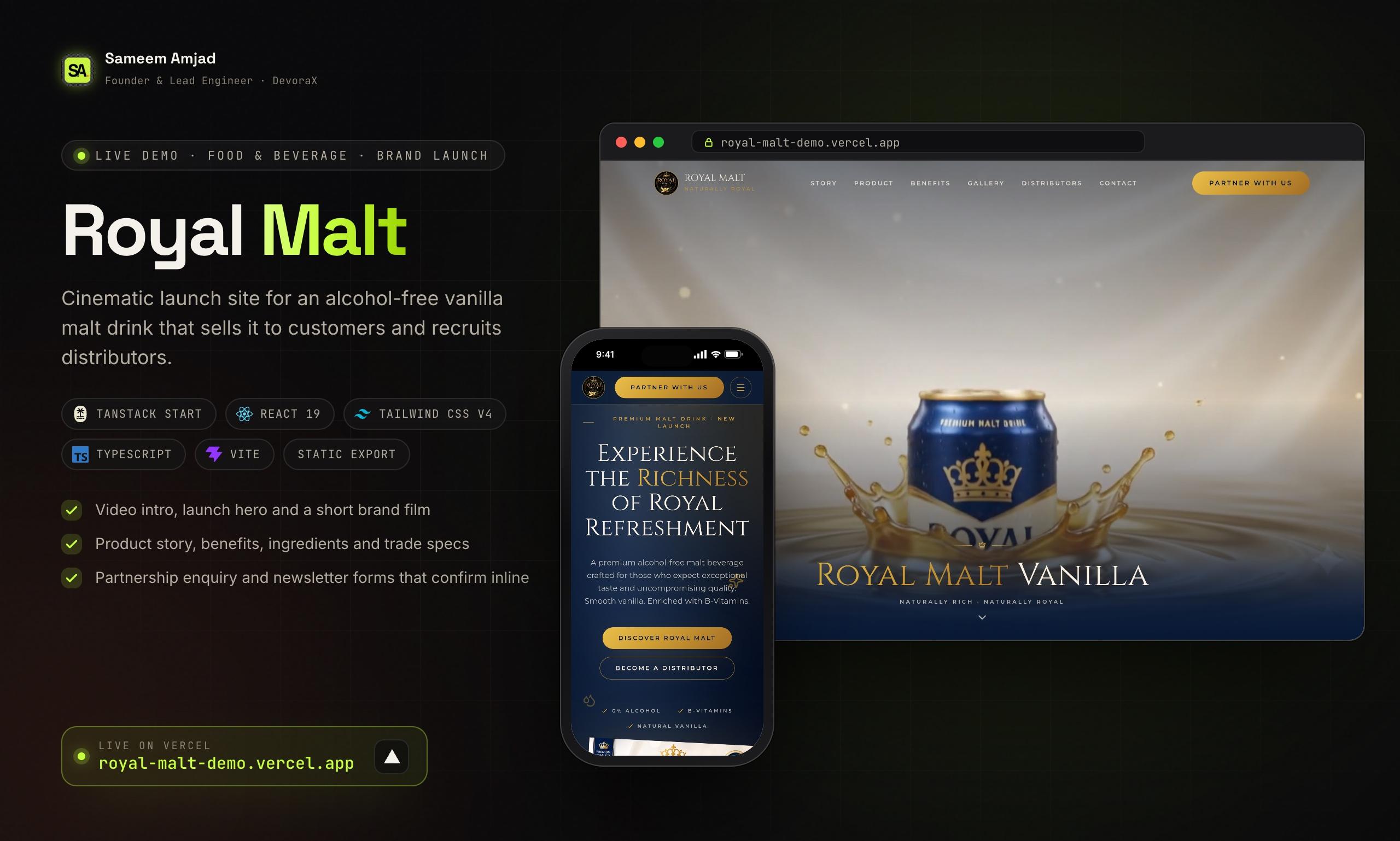
Facts about the build and who it was for. Any figure here is shown on a public store listing or site linked on this page. See how we present portfolio work.
Walkthrough
Screens
Project Story
A new drink brand needed a launch site that felt as premium as its packaging, spoke to consumers and trade buyers alike, and could run on the client's existing cPanel shared hosting, which has no Node.js.
A video intro, a launch hero with the campaign poster and a short brand film; the brand story, its benefits, six ingredients and lifestyle moments as quick-scan sections; trade specifications and a gallery of the can, shrink pack and retail carton for distributors; a partnership enquiry form and a newsletter signup that validate and confirm on the page; a phone menu and layouts with no sideways scroll; all prerendered to plain HTML with a sitemap, a social preview image and cache rules, so it runs on any shared host.
Live demo of the site, where the forms validate and confirm but send nothing, with a 1½-minute walkthrough recorded on it.
Project Details
Royal Malt's launch site is one cinematic page for an alcohol-free vanilla malt drink, written for customers and for the trade buyers who might distribute it. It opens on a product film, tells the brand story, lays out the ingredients and trade specifications, and ends in a partnership enquiry form. It is a client project: Sameem worked on it as a front-end engineer, in TanStack Start and React 19 with Tailwind CSS v4, prerendered to plain HTML so it runs on the client's cPanel shared hosting. The live demo is linked from this page, with a 1½-minute walkthrough recorded on it.
Tech Stack
Where to See It
Opens the project’s page on the demo hub in a new tab, with any logins the demo needs.
Category
TanStack Start & ReactRoyal Malt is a one-page launch site for Royal Malt Vanilla, an alcohol-free vanilla malt drink, for consumers and for trade buyers who might distribute it. Royal Malt is a client project: Sameem worked on it as a front-end engineer for a client. The page opens on a product film and a launch hero, then covers the brand story, ten reasons to choose the drink, six ingredients, trade specifications, a packaging gallery, a partnership enquiry form and an FAQ. It is built with TanStack Start and React 19 but prerendered to plain HTML, with a sitemap, a social preview image and cache rules, because the client's cPanel shared hosting has no Node.js. A demo copy can be tried at demoprojectsforclients.sameemamjad.com/projects/royalmalt, and a 1½-minute walkthrough recorded on the live demo is on this page.
What you can check
- Live demo: demoprojectsforclients.sameemamjad.com/projects/royalmalt, which opens the one-page brand site with nothing to sign in to
- A 1½-minute walkthrough video on this page, recorded on the live demo
- The demo's trade specifications list a 500 ml aluminium can and 24 cans per carton
Each item points to something public: a store listing, a live site or a demo build. See our terms for how we present portfolio results.
What did the Royal Malt launch site need to do?
Royal Malt Vanilla is a new alcohol-free malt drink, and the site presents it as launching across Africa, Europe and the Middle East. Its launch site has two jobs: make the product appealing to people who will drink it, and give an importer or retail buyer enough to start a conversation about stocking it.
The brief added two constraints. The site had to feel as premium as the packaging, with large product photography, film and a palette of navy, cream and gold. It also had to run on the client's existing cPanel shared hosting, which has no Node.js.
That second constraint shaped most of the engineering. A modern React framework expects a server process to render its pages, which this kind of hosting will not run, so the site keeps the framework for development and is prerendered to static files at build time.
How does one page serve both drinkers and distributors?
The page is ordered so each audience reaches its own material without a second page. It opens on a full-width product film, then the launch hero, which offers two paths: discover the drink, or become a distributor. A Partner With Us button stays in the fixed header throughout.
Consumer material comes first: the brand story, the can from front, side and back, ten reasons to choose it, six ingredients, the occasions it is meant for and a short brand film. Launch pages are usually skimmed, so these are quick-scan cards.
Trade material follows. A specifications table lists the format, a 500 ml aluminium can, and the case, 24 cans per carton. A gallery shows the can, the shrink pack and the retail carton. Then comes the partnership enquiry, the page's main call to action, followed by the FAQ and a newsletter signup.
On phones the navigation collapses into a menu, and nothing scrolls sideways.
Why use TanStack Start if the host can't run Node.js?
TanStack Start is a full-stack React framework whose normal build produces a server bundle that renders each page on request, which a host without Node.js cannot run. But rendering can move from request time to build time. Prerendering runs the same React components once during the build and writes the HTML each route produces to disk. The host serves a finished index.html with every heading and FAQ answer already in the markup, and React then hydrates it in the browser to attach the interactive parts, such as the phone menu and the forms.
The usual alternative is a single-page app that ships an almost empty HTML file and builds the page in the browser. That also runs on a static host, but crawlers and link previews that do not execute JavaScript see very little of it. Prerendering gives the host a complete page while development keeps the framework's components and dev server.
The FAQ follows the same thinking. It uses the browser's native disclosure element, so answers open before any JavaScript has loaded.
How is the site packaged for cPanel hosting?
The static export is opt-in. A build flag switches on TanStack Start's prerenderer with link crawling, so it starts at the home page and follows internal links to every route.
The result is a self-contained folder of prerendered HTML, content-hashed JavaScript and CSS, and the page's own images and films, so the site relies on no other service for its media.
A post-build script fills the gaps. The project's sitemap is a server route, and a server route cannot exist without a server, so the script writes sitemap.xml as a real file, along with robots.txt and the Apache configuration that carries the cache rules.
Deploying is then a file copy: zip the folder, upload it through cPanel's File Manager and extract it into the document root. Because the output is plain files, any basic static file server can check it first.
What do the cache rules on shared hosting do?
cPanel hosts commonly serve sites through Apache, where a .htaccess file in the document root sets headers and rewrites without access to the main server configuration, and the post-build script writes one.
Caching matters most on a media-heavy page. JavaScript and CSS files carry a hash of their contents in their names, so a changed file always gets a new name. That makes it safe to tell browsers to keep them, with the images and films, for a year as immutable. The HTML gets no-cache, so browsers check for a new version on each visit and a fresh upload shows straight away.
The file also turns on compression for text, stops directory listings, and sends any path that is not a real file back to index.html, so a refresh or a stray link gets the page instead of the host's error page.
The module-specific rules sit inside IfModule checks. Shared hosts enable different Apache modules, and a directive for a missing one can cause a server error for the whole site. Wrapped, the directive is skipped.
How do the sitemap and social preview image work?
A sitemap is only useful with absolute URLs, so the build takes the site's address as a setting and writes it into sitemap.xml. The robots.txt file carries a Sitemap line pointing to it.
Link previews have a similar catch. When a link is shared, the platform's crawler reads the page's Open Graph and Twitter Card tags and shows the image they name, and those crawlers generally expect an absolute URL. The post-build script rewrites the social image tags to absolute URLs and adds a canonical link and og:url, so every share points to one address.
The social image is the campaign poster from the hero, so a shared link looks like the launch it leads to.
The demo copy is built with one extra flag that adds a noindex tag and a robots.txt that disallows crawling, so it is hidden from search engines and never competes with the brand's own domain.
How does the page handle film and photography?
Video carries much of the page's feel and much of its weight. The intro film autoplays muted, loops and plays inline: most browsers only autoplay muted video, and inline playback stops iPhones from opening it full screen. The campaign poster is its poster frame, so an image fills the screen before any video arrives. The brand film further down has controls and its preload set to metadata, so the browser fetches only the file's basic details and the film costs little until someone presses play.
Sections fade up as they come into view. A small hook uses the browser's IntersectionObserver to reveal each block once part of it is visible, then stops watching, so scrolling stays cheap and nothing replays on the way back up.
How do the enquiry and newsletter forms work?
The partnership enquiry asks for a name, company, email address and country, all required, plus a business type and an optional message. The newsletter signup asks for an email address.
Both forms use the browser's own validation, so an incomplete or malformed entry is blocked and the field that needs attention is pointed out. On a valid submission the page confirms in place, addressing the enquirer by first name, and clears the form. The confirmation is a status region, so screen readers announce it.
In the demo nothing is sent, and both confirmations say so.
A static site still needs somewhere to send enquiries: sites like this usually post to a small PHP script on the host or to a hosted form service.
Where can you see Royal Malt?
Royal Malt is a client project: Sameem worked on it as a front-end engineer for a client. The public demo is a separate copy, reached from demoprojectsforclients.sameemamjad.com/projects/royalmalt, with nothing to sign in to.
A visitor can watch the film intro, scroll the story, reasons, ingredients and occasions, play the brand film, read the trade specifications and browse the packaging gallery. FAQ answers open in place, and the phone menu appears on a narrow screen. Both forms check their fields and confirm on the page but send nothing, and say so.
This page also carries a 1½-minute walkthrough recorded on the live demo, covering the film intro and launch hero, the product story and ingredients, the trade specs and gallery, a partnership enquiry and the FAQ.
Why this stack
- TanStack Start: the React framework the site is built on. It normally renders pages on a server, but its prerenderer can run the same routes at build time and write finished HTML, which is what a host with no Node.js needs. Head tags are declared per route, keeping the title, description and social image beside the page they describe.
- React 19: the page is a long run of sections built from small shared pieces, so components keep the look consistent from hero to footer. In the browser, React hydrates the prerendered HTML and attaches the phone menu and form handling to markup already on screen.
- Tailwind CSS v4: version 4 moves configuration into CSS, so the navy, cream, ivory and gold palette is defined once as custom properties and exposed as utility classes. Utilities keep responsive rules beside the markup they affect, which helps when every section must hold together from a phone to a wide screen.
- TypeScript: shared components such as buttons and form fields have typed props, imported media descriptors carry their URLs as typed data, and the router checks routes. A renamed asset or a missing prop becomes a build error instead of a broken image on the page.
- Vite: the build tool and dev server under TanStack Start. Its content-hashed file names are what make the year-long immutable cache rule safe: a changed file gets a new name, and the no-cache HTML points to it.
- Prerendered static export: chosen because the client's cPanel hosting serves files but cannot run Node.js. Prerendering keeps the full page in the HTML for crawlers and link previews, and a post-build script adds the sitemap, robots.txt, absolute social image URLs and an Apache .htaccess with cache, compression and fallback rules.