LearnHub
A members' course platform where paid tiers unlock video courses, a media library and progress tracking, with an admin console for plans, roles, courses and an audit log.
Facts about the build. Any figure here is shown on a public store listing or site linked on this page. See how we present portfolio work.
Walkthrough
Screens
Project Story
Selling courses by tier means every video, file and lesson has to check the learner's plan, and the checks have to hold even when someone calls the API or the storage directly. Learners expect to resume mid-video on any device, and the people running the business need to see and change plans without a developer.
Three tiers, each including the one below, with pricing that lists exactly what each unlocks; course pages with lesson progress, free previews and a clear prompt to the plan a locked lesson needs; videos and files in a private bucket behind signed links after the plan check; a player that resumes, saves progress, completes at 90% and keeps timestamped notes; row-level security on every table, with plans, roles and courses changed only through server routes; and an admin console with plan grants, bulk changes, roles, publishing and an audit log.
Live demo on sample courses and learners with one-click demo logins for a Pro learner and a demo admin, and a 2-minute walkthrough recorded on it.
Project Details
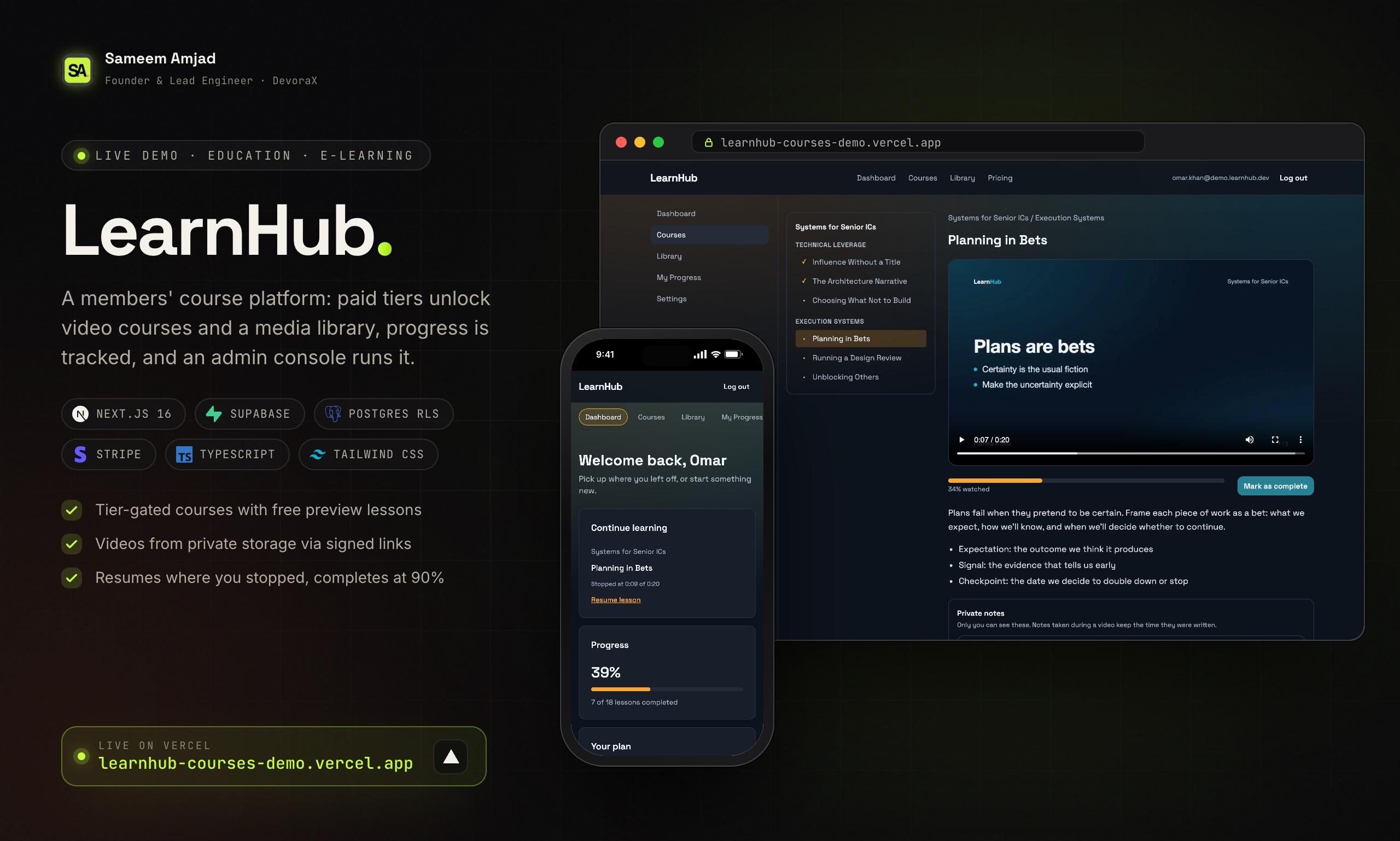
LearnHub is a subscription learning platform. Three paid tiers unlock video courses and a library of handbooks, audio sessions and e-books, with free preview lessons for anyone signed in. Lesson videos and library files sit in a private Supabase Storage bucket and are served through short-lived signed links after the plan check. The player resumes where the learner stopped, saves progress as they watch, completes the lesson at 90% and keeps private notes stamped with the video time. Row-level security covers every table, and admins manage plans, roles and course publishing with every change in an audit log. Stripe checkout and webhooks are built in; the live demo runs on sample courses and learners with Stripe switched off, and a 2-minute walkthrough is recorded on it.
Tech Stack
Where to See It
Opens the project’s page on the demo hub in a new tab, with any logins the demo needs.
Category
Next.js & SupabaseLearnHub is a subscription learning platform for a business that sells courses by plan. Three paid tiers, each including the one below, give access to video courses and a library of handbooks, audio sessions and e-books. Sameem Amjad, DevoraX's founder, worked on this build. Learners resume a video where they stopped, complete a lesson once playback reaches 90% or with a button, and keep private notes stamped with the video time. Files are served through short-lived signed links after a plan check, and row-level security covers every table. Admins manage plans, roles and courses, and each change is logged. It runs on Next.js 16 and Supabase, with a Stripe subscription path that is switched off on the demo. The demo, on sample data, is at demoprojectsforclients.sameemamjad.com/projects/learnhub, and a 2-minute walkthrough is on this page.
What you can check
- Live demo: demoprojectsforclients.sameemamjad.com/projects/learnhub, opening the course platform, with one-click demo accounts on its login page
- A 2-minute walkthrough on this page: catalogue-built pricing, a resumed video lesson with a timestamped note, the library and a plan grant in the audit log
- In the demo, the pricing page lists each sample course and library item under the tier that opens it
Each item points to something public: a store listing, a live site or a demo build. See our terms for how we present portfolio results.
What does a course platform sold by tier have to get right?
Selling courses by plan puts a check in front of every video, file and lesson. A check that lives only in the page is easy to walk around: platforms of this kind usually expose an API and a file store as well, and a video with a public address can be shared with anyone. The rule has to hold wherever the content can be reached.
Learners watch in short sessions, often on more than one device, and expect the platform to remember where they stopped. The people running the business need to change a learner's plan or publish a course without a developer, and to see afterwards who changed what.
How do the three plans decide what a learner can open?
The tiers are Insider, Core and Pro. Each is a level from 1 to 3, and a learner can open a course or library item when their plan's level is at least the item's. Only an active or trial plan counts, so a past-due or cancelled plan opens nothing.
The pricing page is built from the catalogue. It reads the published courses and the library and lists each under the tier it needs, so adding a course changes the page without anyone editing it. The demo lists Insider at $29, Core at $79 and Pro at $199 a month, with a yearly option that saves 10%.
Preview lessons are open to anyone signed in. Locked lessons show a padlock, and opening one directly leads to the pricing page with a line naming the plan that course needs and that plan's card highlighted.
How are lesson videos and library files kept behind the plan?
Videos and library files sit in a private Supabase Storage bucket, so none has a public address. A file is reached only through a signed URL, a link carrying a signature and an expiry time, and the app creates one only after its own plan check.
For a lesson, the server checks that the learner is signed in and that the lesson is a preview or covered by their plan, and only then signs the video's path, for two hours.
Library files go through two routes that make the same check. The stream route, used by the PDF viewer and the audio player, signs the file for ten minutes and passes the bytes through the app, forwarding range requests so audio can be skipped through. The download route redirects to a link that lasts an hour, which is how the EPUB is offered.
What does row-level security allow, and what goes through the server?
Supabase lets a browser query the database directly with a public key, so row-level security, a Postgres feature that attaches rules to each table, decides what any query can see or change. LearnHub turns it on for every table. Published courses are public, and lesson rows are visible to a signed-in learner only for previews or where their active plan reaches the course's tier.
A browser can write only to the progress, notes and bookmarks tables, and only rows carrying its own user id. No policy lets it change plans, roles, courses or the audit log. Those change through server routes, which check the caller first.
The routes repeat the checks. Saving progress confirms the lesson is in a published course and is a preview or covered by the plan, and the user id always comes from the session. A database trigger gives each new sign-up a profile and the member role without ever blocking the sign-up.
How does LearnHub resume a lesson and mark it finished?
The player saves the playback position every 10 seconds while a video plays, on pause, and, as a beacon request, if the learner moves to another page mid-video. The position is stored against the learner's account rather than in the browser, so the lesson reopens at the same second on another device.
A lesson is marked complete when playback reaches 90% of the video, when the video ends, or when the learner presses Mark as complete, which is also how reading lessons are finished.
Completion stays set. Position saves never write the completed field, so re-watching a finished lesson can't undo it, and the first completion time is kept.
The dashboard's Continue learning card picks the lesson the learner worked on last and shows where they stopped. If that lesson is finished, it offers the next unfinished one in the same course.
How do notes stamped with the video time work?
Each lesson has a private notes panel. A note saved while a video is loaded records the second the video had reached, and the list, newest first, shows that time as a small badge. Clicking the badge moves the video to that point and plays it, so a note leads back to the moment that prompted it. Notes on reading lessons have no time.
The server reads and writes notes filtered by the signed-in user's id, and the notes table's policy gives a browser its own notes only.
How do Stripe subscriptions fit, and what happens on the demo?
The code contains a full Stripe path. Choosing a plan opens a Stripe Checkout session in subscription mode for that tier's price. A portal route opens Stripe's hosted billing portal, and a webhook route keeps the plans table in step.
The webhook checks Stripe's signature on the raw request before trusting any event. Completed checkouts, subscription changes and successful payments are synced to the plans table, with the subscription's price mapped to a tier; a failed payment marks the plan past due, which locks the courses. Webhooks are the usual source of truth, since a buyer may close the browser before checkout returns.
On the demo Stripe is switched off (demo mode). Choosing a plan switches it on straight away, with no card and nothing charged. The billing page says no Stripe account is connected and hides the portal button, and no payment runs anywhere on the demo.
What can an admin change, and how is it recorded?
The console sits behind two checks: the proxy sends anyone without the admin role away from /admin, and every admin API route checks the role again. Its overview counts learners, plans by tier and status, published courses and lessons, and the share of started lessons that are finished.
The users list searches by name or email and filters by tier, status and role. An admin can grant a tier to one learner or a ticked selection, or revoke access, which ends it at once and keeps the plan on record as cancelled. The Roles tab makes a learner an admin and won't remove the last one. The Courses tab publishes and unpublishes courses, drafts included.
After each change the route writes an audit line: who acted, what they did, to which learner or course, any tier, and when. Only admins can read the log.
The shared demo admin is limited in the server routes: it can change plans and roles only for the seeded sample learners, can't remove admin roles and can't unpublish courses. Its session carries a flag the database checks too, and a restrictive policy and a trigger on every table refuse any delete made with it.
Where can you see LearnHub?
Sameem Amjad, DevoraX's founder, worked on this build. The demo is reached from demoprojectsforclients.sameemamjad.com/projects/learnhub and runs on sample courses and learners with Stripe switched off.
The login page has one-click buttons for two demo accounts, with logins listed on the hub page: a Pro learner with courses in progress, notes and the library, and the demo admin with the console and audit log. A visitor can also sign up with any email, watch the preview lessons and choose a plan, which switches on at once with no card and nothing charged.
The courses, lesson videos and library files are sample material made for the demo: short narrated slides, two PDFs, an audio session and an EPUB. The landing page's figures and testimonials are sample copy.
The 2-minute walkthrough on this page covers pricing built from the catalogue, a Pro learner resuming a video lesson with a timestamped note, the library, then the demo admin granting a plan and finding it in the audit log.
Why this stack
- Next.js 16: the course, lesson and library pages render on the server, where the plan check runs before a video link is signed, so a locked lesson redirects before any link exists. Route handlers hold the progress, notes, media, admin and Stripe endpoints, and the proxy file, Next.js 16's name for middleware, guards the signed-in and admin pages.
- Supabase (Auth, Postgres, Storage): one service covers sign-in, data and files. Auth issues the session the database policies read, Postgres holds the catalogue, plans, progress, notes and audit log, and Storage keeps the media in a private bucket. The server reads with the service role, which bypasses the policies, so the app's routes and pages check access themselves before returning anything a plan protects.
- Row-level security: policies on every table keep the access rules in force even for someone calling the database API directly. Browsers write only their own progress, notes and bookmarks, lesson rows are filtered by tier, and the demo admin's deletes are refused. The server routes, which bypass the policies, apply the same rules in code.
- Stripe subscriptions: Checkout and the hosted billing portal keep card entry on Stripe's pages, and a signature-checked webhook keeps the plans table in step. Each tier maps to a Stripe price through configuration. On the demo this path is switched off and no payment is taken.
- TypeScript: the tiers are one union type shared by pricing, the access checks and the admin console. Request bodies for progress, notes, checkout and the admin routes are parsed with Zod before use, which rejects a malformed id, an unknown tier or an oversized note at run time, where types alone can't.
- Tailwind CSS: utility classes keep layout beside markup. The lesson sidebar stays sticky beside the player on large screens, and the plans sit in three columns from tablet width. The navy and amber palette is defined once as CSS variables and mapped to Tailwind colour names.