AR Lip Filler Preview
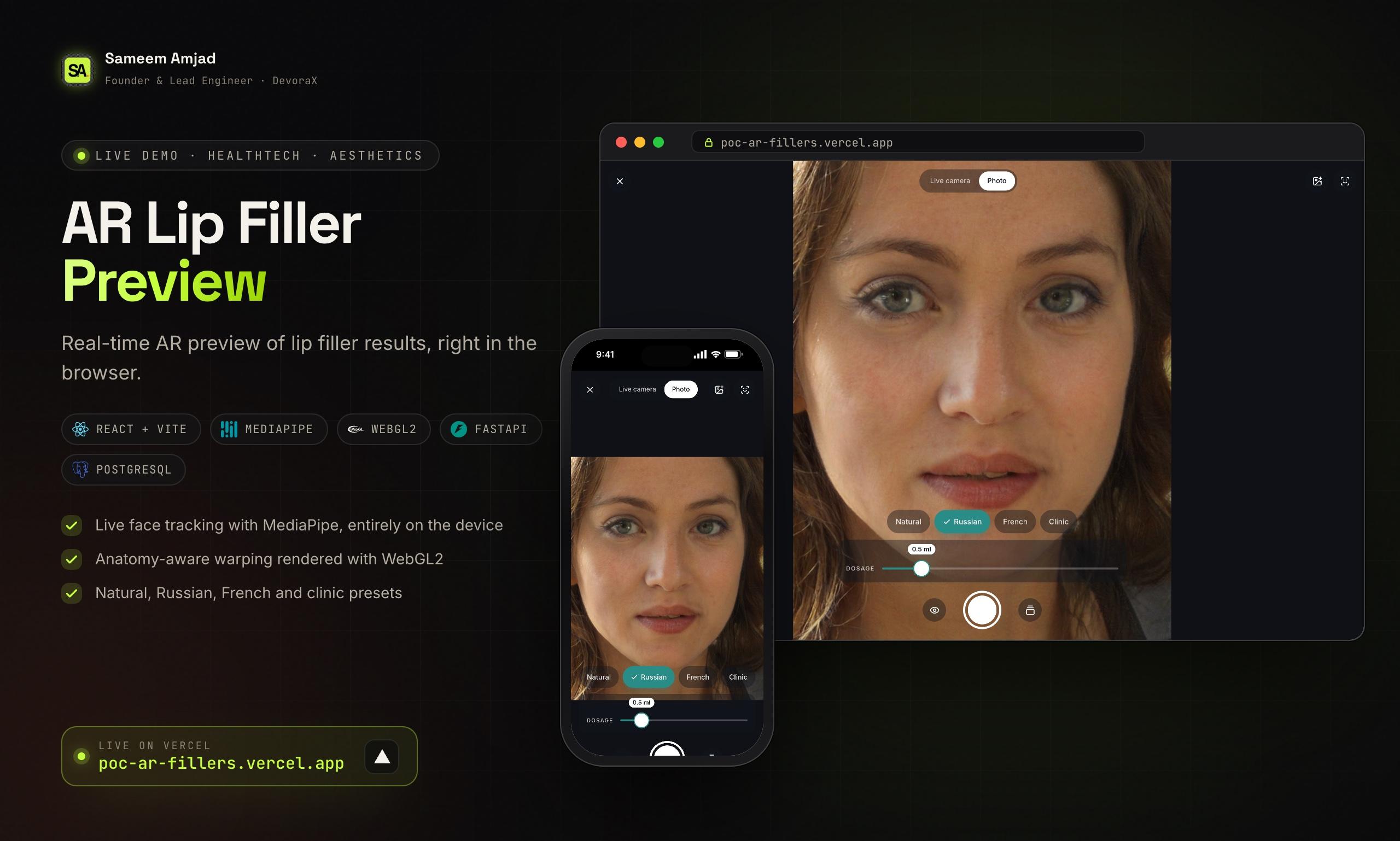
Real-time AR preview of lip filler results in the browser, for aesthetic clinics. A proof of concept: Sameem built it as the full-stack engineer.
Facts about the build and who it was for. Any figure here is shown on a public store listing or site linked on this page. See how we present portfolio work.
Walkthrough
Screens
Project Story
Patients find it hard to picture what lip filler will look like on their own face, and consultations rely on before-and-after photos of other people.
Live face tracking with MediaPipe, running entirely in the browser; anatomy-aware warping and a WebGL2 renderer; style presets (natural, Russian, French, clinic) with adjustable volume; a side-by-side before-and-after comparison; and saved before/after pairs that feed a training dataset for future models.
Live demo in the browser, no login needed, with a 90-second walkthrough recorded on it.
Project Details
AR Lip Filler Preview is a proof of concept for aesthetic clinics: the phone camera tracks the face and reshapes the lips live, so a patient can preview filler styles before treatment. Sameem built it as the full-stack engineer: MediaPipe face tracking and a WebGL2 renderer in a React and Vite app, with a FastAPI and PostgreSQL backend that keeps saved before-and-after pairs. The live demo needs no login and is linked from this page, with a 90-second walkthrough recorded on an AI-generated face of a person who does not exist.
Tech Stack
Where to See It
Opens the project’s page on the demo hub in a new tab, with any logins the demo needs.
Category
React & WebGL Proof of ConceptAR Lip Filler Preview is a browser app for aesthetic clinics: the phone camera tracks the face and reshapes the lips live, so a patient can preview filler styles before treatment. It is a proof of concept: Sameem built it as the full-stack engineer. MediaPipe tracks the face on the device, a WebGL2 renderer applies anatomy-aware warping with four style presets and adjustable volume, and a FastAPI and PostgreSQL backend keeps saved before-and-after pairs. It is a visual preview to support a consultation conversation, not a prediction of a treatment result. The live demo is on the demo hub, and a walkthrough video is on this page.
What you can check
- Live demo, no login needed: demoprojectsforclients.sameemamjad.com/projects/ar-lip-filler (works best on a phone; allow camera access)
- A 90-second walkthrough video on this page, recorded on the live demo using an AI-generated face of a person who does not exist
- Four style presets (natural, Russian, French and clinic) with adjustable volume, and a side-by-side before-and-after comparison
Each item points to something public: a store listing, a live site or a demo build. See our terms for how we present portfolio results.
What problem was AR Lip Filler Preview built to solve?
Lip filler is a decision about a person's own face, yet consultations usually rely on before-and-after photographs of other people. Patients find it hard to picture what filler will look like on them, and someone else's lips are a weak guide to how a change would sit on a different face.
AR Lip Filler Preview is a proof of concept for aesthetic clinics aimed at that gap. The phone camera tracks the face and reshapes the lips live, so a patient can preview filler styles on their own face before treatment. Sameem built it as the full-stack engineer, from the in-browser tracking and rendering to the backend.
This is a visual preview to support a consultation conversation. It does not predict or guarantee a treatment result, and it makes no claim to medical accuracy.
How is AR Lip Filler Preview put together?
The app has two halves. The front end is a React app built with Vite that does all of the real-time work on the device: it reads camera frames, runs MediaPipe face tracking and hands the result to a WebGL2 renderer that warps the lip region and draws the preview. The interface around it holds the style presets, the volume control and the before-and-after comparison. The back end is a FastAPI service with PostgreSQL behind it, which keeps the before-and-after pairs that are saved; those pairs feed a training dataset for future models.
The split follows the problem. Work that happens many times a second stays on the phone, with no network round trip to wait for; only what has to persist goes to a server. Pipelines of this kind usually run as a loop of capture, locate, deform and render.
Why does the face tracking run in the browser?
MediaPipe face tracking runs entirely in the browser, for privacy and for latency. Live tracking processes a continuous stream of images of someone's face, and tracking on a server would mean uploading every frame; on the device, no video leaves the phone for tracking. A preview that follows the face also has to respond within moments of each movement, and a round trip over a mobile connection is too slow and too variable for that.
The trade-off is that the work lands on whatever phone the visitor has, so in-browser vision has to suit ordinary hardware, and the tracking model must download before the first frame is processed. Camera access has its own rules: browsers expose the camera only on secure pages and only after the user grants permission, and mobile browsers each handle inline video in their own way.
What does face-landmark tracking give the preview?
Face-landmark tracking turns a camera image into geometry. In general terms, a landmark model such as MediaPipe's finds the face in each frame and returns a dense set of points across it, including the outer and inner edges of both lips. Because each point keeps its identity from frame to frame, the software knows not only where the mouth is but which point is a corner of the mouth and which marks the centre of the upper lip.
That correspondence is what makes a reshaping effect possible. The effect needs the lip outline in every frame while the head turns and the person talks, and the landmarks carry enough position and scale for it to stay attached to the lips rather than to a fixed patch of screen. A preview built this way is only as steady as its tracking, which is why systems of this kind usually smooth landmark positions over time.
Why warp the lips by anatomy instead of scaling them?
The naive way to make lips look fuller is to scale up the mouth region, and it looks wrong at once. Scaling enlarges everything equally: the mouth gets wider as well as fuller, the corners drift outward, the surrounding skin stretches, and the edge of the enlarged patch shows. A preview that behaves like a zoom gives a consultation nothing useful to discuss.
Anatomy-aware warping treats the lip as a structure with parts. An approach of this kind can add volume to the body of each lip while holding the corners of the mouth in place, shape the lip border where a style calls for it, and fade into the skin with no visible seam. The usual way to express that is a deformation driven by the tracked landmarks, moving each pixel near the mouth according to where it sits relative to the lip outline. The hard part is keeping it stable while someone smiles or speaks.
Why is the preview rendered with WebGL2?
Warping a face live means moving a great many pixels on every frame, each by its own amount, which is the work a graphics processor is built for. WebGL2 gives a web page access to the phone's GPU: the camera frame can become a texture, the lip deformation can be computed in a shader or carried by a mesh whose points follow the landmarks, and the warped image can be drawn in one pass. On the CPU, with 2D canvas operations, it would compete with the interface and the tracking, and real-time frame rates would be hard to hold.
Over the original WebGL, WebGL2 adds a more capable shading language and richer texture support, which help with smooth deformation and blending, and current mobile browsers broadly support it. The usual trade-offs apply: shaders can differ slightly across mobile GPUs, and a page must recover if the browser drops its graphics context.
How do the style presets and the before-and-after comparison work?
The preview offers four style presets, natural, Russian, French and clinic, each with adjustable volume. In a system like this a preset is best understood as a named set of parameters for one warp rather than a separate effect: how volume is shared between upper and lower lip, how defined the border is and how far the effect reaches into the skin. The volume control turns that set up or down. Built that way, every style shares one rendering path, and tuning a style means changing values rather than writing rendering code.
The side-by-side comparison is what makes the effect useful in conversation. A reshaped face on its own invites a judgement against memory; the unchanged face beside it, at the same moment and angle, makes the difference plain. The presets give a consultation a shared vocabulary, and the comparison a common point of reference.
What does the FastAPI and PostgreSQL backend do?
The backend has a narrow job: it keeps the before-and-after pairs that are saved, and those pairs feed a training dataset for future models. FastAPI suits that role, as a Python framework that validates requests against declared types, in the language most machine-learning tooling is written in. PostgreSQL suits the structured side. Systems that collect images usually keep the files in object storage and the descriptive data about each pair in a relational database, so a dataset can be queried without moving large files around.
Collecting images of faces brings obligations that sit above the code. As general engineering considerations, a system like this needs clear consent before an image is kept, a stated purpose for the data, a way to find and delete a person's images, and care over who can read them. Those are decisions to make early, not features to add later. DevoraX holds no security or compliance certifications.
Where can you see AR Lip Filler Preview?
There is no live product: AR Lip Filler Preview is a proof of concept. The live demo is on the demo hub at demoprojectsforclients.sameemamjad.com/projects/ar-lip-filler. It needs no login and works best on a phone, and the browser asks for camera access, which must be allowed for the preview to run.
This page also carries a 90-second walkthrough recorded on the live demo, using an AI-generated face of a person who does not exist. It lets a visitor watch the preview in use without turning on a camera, and it shows a tool built for faces on a face that belongs to nobody. As everywhere in the product, what the demo and the video show is a visual preview to support a consultation conversation, not a prediction of how a treatment would turn out.
Why this stack
- React + Vite: the interface is small but stateful, with a camera view, preset selection, a volume control and a comparison that must stay in step. React keeps those controls declarative, so the chosen preset and volume are simply state, and the usual pattern for real-time graphics in React keeps per-frame drawing on a canvas, outside React's render cycle. Vite gives fast builds and ships the app as static files.
- MediaPipe face tracking: an established face-landmark model that returns a consistent set of points across the face, including a detailed lip outline, from an ordinary camera frame. It runs in the browser, so no video leaves the device for tracking and no frame waits on a network round trip. A proven tracker leaves the product-specific engineering where it belongs: in the warp, the presets and the renderer.
- WebGL2: live face warping is per-pixel work on every frame, which belongs on the GPU. WebGL2 exposes the phone's graphics processor to a web page, so the camera frame can be a texture and the deformation can be computed in shaders and drawn in one pass. Its shading language and texture support improve on the original WebGL, and current mobile browsers broadly support it.
- FastAPI: the backend receives and keeps saved before-and-after pairs, and FastAPI fits a narrow, well-typed API of that kind. Requests are validated against declared models, so a malformed upload can be rejected before it reaches a dataset, and the API documentation comes from the same definitions. Being Python, it shares a language with the machine-learning tooling that a training dataset for future models would most likely meet.
- PostgreSQL: a training dataset is only as useful as the data that describes it. A relational database gives saved pairs a structured, queryable home, with constraints that keep that data consistent and transactions that stop a save from being half-recorded. It also suits the general obligations of collecting face images, such as deleting a person's data on request, which depend on knowing what each saved pair is and where it came from.