Triagely
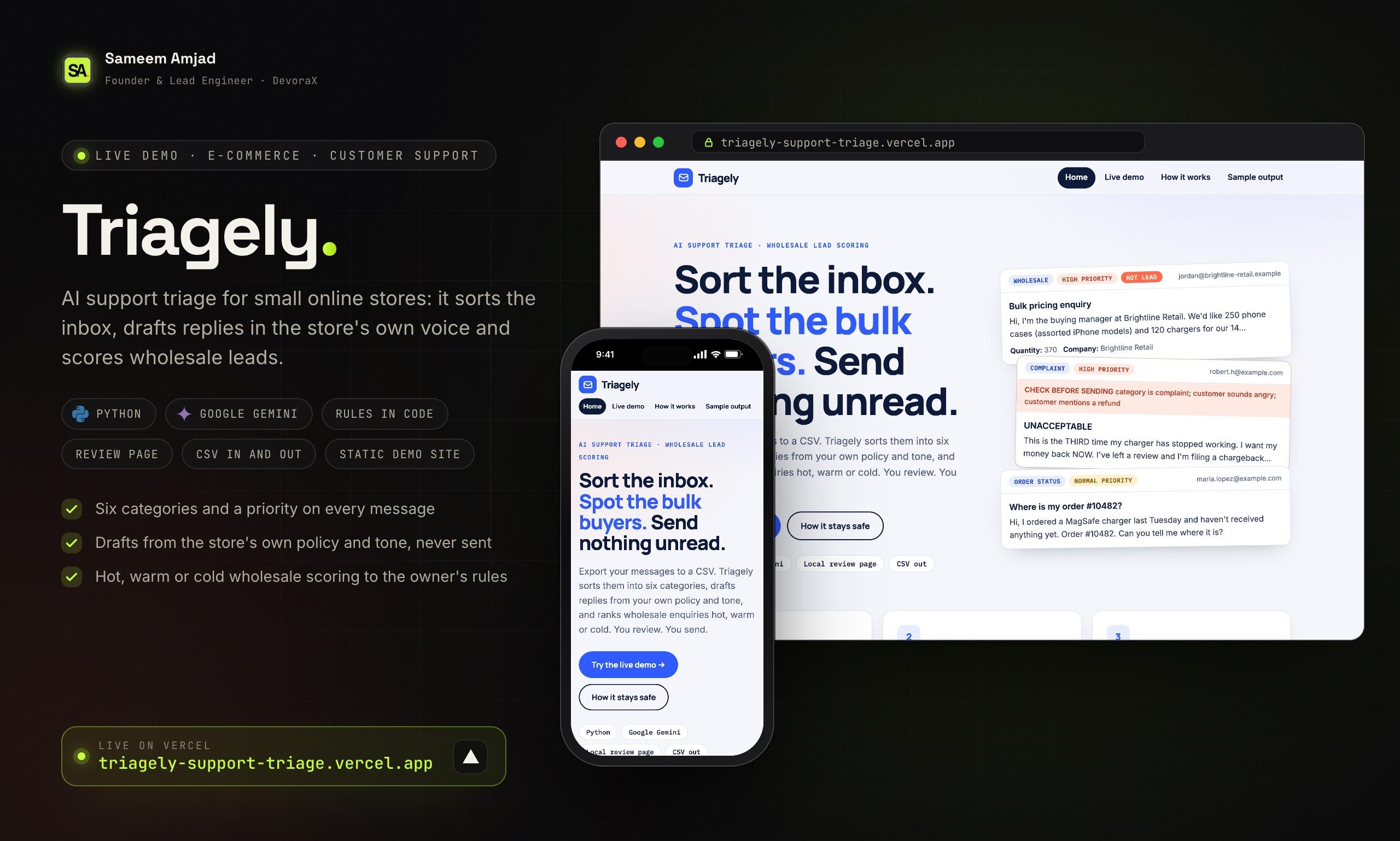
AI support triage for a small online store: it sorts a CSV of customer messages, drafts replies in the store's own voice and scores wholesale leads. A DevoraX client project: Sameem built it for a client of DevoraX.
Facts about the build and who it was for. Any figure here is shown on a public store listing or site linked on this page. See how we present portfolio work.
Walkthrough
Screens
Project Story
A small store's inbox mixes order questions, returns, complaints and the occasional bulk buyer, and the owner answers every one by hand. The valuable wholesale enquiries get buried, and an AI that replies on its own can promise a refund or claim an order has shipped when it hasn't.
Six categories and a high, normal or low priority on every message; draft replies written from a one-page policy and a few of the owner's own replies; wholesale enquiries scored hot, warm or cold by the owner's thresholds, ignoring any quantity or company the message doesn't contain; rules in code that flag refunds, angry customers, claimed order statuses, promises and quoted prices; and a review page with a wholesale-only view and a copy button on every draft, plus a CSV of everything. The policy, the tone and the scoring live in three plain files the owner can edit.
Live demo of the review page from one real run on 30 fictional messages, with live scoring rules and a 2-minute walkthrough recorded on it.
Project Details
Triagely reads a CSV export of a store's customer messages, gives each one of six categories and a priority, drafts a reply from the store's one-page policy and a few of the owner's own replies, and scores wholesale enquiries hot, warm or cold by the owner's rules. Rules that run in code flag every risky draft, and nothing is ever sent: the owner reviews each draft and sends it themselves. It is a DevoraX client project: Sameem built it for a client of DevoraX, in Python with Google Gemini. The live demo shows the review page from one real run on 30 fictional messages, with a 2-minute walkthrough recorded on it.
Tech Stack
Where to See It
Opens the project’s page on the demo hub in a new tab, with any logins the demo needs.
Category
Python & Gemini AITriagely is an AI support triage tool for a small online store. It reads a CSV export of customer messages, gives each one of six categories and a high, normal or low priority, drafts a reply from the store's own policy and tone, and scores wholesale enquiries hot, warm or cold. Triagely is a DevoraX client project: Sameem built it for a client of DevoraX. Google Gemini reads each message, and rules in Python set the lead scores, check quantities and companies against the message and flag the drafts a person must check. The results open as a review page and a CSV, and nothing is ever sent. The demo, a real run on 30 fictional messages, is at demoprojectsforclients.sameemamjad.com/projects/triagely, and a 2-minute walkthrough is on this page.
What you can check
- Live demo: demoprojectsforclients.sameemamjad.com/projects/triagely (the review page from a real run on 30 fictional messages, plus a demo-only scoring panel)
- A 2-minute walkthrough on this page: the safety rules, the flagged drafts, the wholesale view and live scoring
- In the demo, moving the Hot lead from slider to 300 units drops Orbit Corp (200 units) to warm; Brightline Retail (370 units) stays hot
Each item points to something public: a store listing, a live site or a demo build. See our terms for how we present portfolio results.
What problem was Triagely built to solve?
A small store's inbox mixes order questions, returns, complaints and the occasional bulk buyer, and the owner answers every one by hand. Messages arrive in the order they were sent, so the valuable wholesale enquiries get buried among delivery questions.
An AI that answers the inbox by itself brings a worse problem. A language model writes confident text whether or not it knows the facts, so an automatic reply can promise a refund the owner never agreed to, or say an order has shipped when nobody has checked.
Triagely keeps the useful half. It sorts each message into one of six categories (order status, returns, product question, wholesale, complaint, other), sets a priority, drafts a reply and scores wholesale enquiries, and the owner decides what to send.
Why does Triagely prepare drafts instead of sending replies?
Nothing in Triagely sends anything. It has no connection to the store's shop software, email or chat apps, and no order look-up: it sees only the text in the CSV. The owner copies each draft from the review page after reading it.
AI-assisted support often keeps a human in the loop this way: the model does the slow reading and drafting, and a person makes the commitment. Without order data, anything said about a parcel would be a guess, so order-status drafts say the order is being checked and a reply will follow.
The tool runs on the store owner's computer with their own Gemini key, and the owner pays Google per message. Customer messages and the store's policy are sent to Google for processing; the tool's notes ask the owner to anonymise anything sensitive and check that this suits their customers' privacy expectations. DevoraX holds no security or compliance certifications.
How do Gemini and the code share the work?
The AI reads and the script decides. For each message Gemini returns a JSON record: a category, a priority with a short reason, the customer's mood, whether a refund is asked for, the quantity and company in a wholesale enquiry, and a draft reply.
The request uses Gemini's structured output. The tool sends a response schema, so the reply must be JSON with exactly those fields, and category, priority and mood can only take allowed values. That removes parsing failures but says nothing about whether the answer is right.
Everything that must behave the same way every time runs in Python. Complaints, angry customers and hot leads are always raised to high priority, whatever the model suggested. On the 30 sample messages the categories matched what was expected, and results can differ between runs.
How are the drafts kept to the store's policy and tone?
Two plain files shape every draft: policy.txt, a one-page policy, and style_samples.txt, a few replies the owner wrote. Both go into the model's instructions on every run, so editing either changes the next batch without touching the code.
Showing a model real examples, often called few-shot prompting, usually sets a tone more dependably than describing one. The instructions add specifics, such as two to four sentences, an opening that reacts to this customer rather than a stock thank-you, and the sign-off on its own line, which the script enforces.
Drafts may use only facts in the policy. They must never invent an order status, dates, prices or specifications, or promise a refund, replacement or compensation; they say the request has been passed to the owner. Instructions steer a model without binding it, so the riskiest of these, an order status, a promise and a price, are checked again in code.
Which drafts are marked "check before sending", and why?
A red CHECK BEFORE SENDING banner, with reasons, marks messages that need the owner's eyes. Some are flagged for what the customer wrote: a complaint, an angry customer, or a mention of a refund, money back or a chargeback. The model reports whether a refund is asked for, and the script also searches the message for words such as "refund" and "chargeback", in case the model misses one.
Others are flagged for what the draft says. An order-status draft containing "has shipped", "is in transit" or a similar phrase is flagged, since the tool cannot know that. So is a draft that promises something ("we'll refund", "free replacement", "compensation"), a wholesale draft with a currency symbol before a number, an empty draft, and any message whose AI request failed.
Phrase lists can miss a paraphrase, so they back up the rule to read every draft rather than replace it. Flagged messages come first on the review page. In the demo's real run, 3 of the 30 drafts were marked: a return asking for a refund and two complaints, one from an angry customer threatening a chargeback.
How are wholesale leads scored hot, warm or cold?
A lead is hot at 100 units or more with a company named, warm from 20 to 99 units, and cold under 20 units or when no quantity is given. A request for 100 or more with no company named is scored warm, with a note saying why. Hot leads are always raised to high priority.
For scoring, the model only finds the quantity and the company. With several products it adds them up, and with a range it takes the lower number. The script applies the thresholds from scoring_rules.json, so the same facts always give the same score. For a store with few wholesale enquiries, a short rule the owner can read is easier to trust than the weighted scoring sales teams often use.
Among the demo's fictional buyers, Brightline Retail (250 phone cases and 120 chargers, 370 units) and Orbit Corp (around two hundred power banks, written in words) are hot, GadgetNest (50 cables) is warm, and one after 10 units is cold.
How does Triagely stop the AI inventing a quantity or a company?
Language models sometimes produce plausible details that are not in the source, and an invented quantity would push a lead to the top. So the script checks both extracted facts before scoring.
It collects every number in the subject and message, written as digits or as words such as "two hundred". The model's quantity is accepted if it appears there or equals the sum of two or three of those numbers, which is how 250 plus 120 is confirmed as 370. A company name is lower-cased, reduced to letters and digits, and looked for in the message and in the sender's email domain.
Anything that fails is ignored, with a line in the Notes column, and the lead is scored on what is actually written. Checking extracted values against their source is a common, inexpensive guard in AI pipelines. It confirms that a number appears, not what it counts, so each wholesale card shows the quantity and company beside the message.
What happens when Gemini is busy or a request fails?
Hosted models turn requests away when busy: HTTP 429 when a caller sends too many, 5xx errors when the service is overloaded. Triagely sends a few requests at a time and retries network errors, 429s and server errors such as 503 on the same model, waiting a little longer after each try.
If a model keeps failing, the tool moves to the next in its list: gemini-3.1-flash-lite by default, falling back to gemini-3-flash-preview when the first is busy. The owner can set a different list in the .env file, which also covers a retired model name.
A rejected key would fail the same way every time, so the tool stops at once and asks the owner to check it. If every attempt for one message fails, the run carries on: that message still appears, marked unprocessed and flagged because the AI request failed, and the log records it for a rerun.
Where can you see Triagely?
Triagely is a DevoraX client project: Sameem built it for a client of DevoraX. The tool runs on the store owner's computer; the public demo is a static site that makes no AI calls. Its store, customers, companies and messages are fictional, and it shows the review page from a real run with Gemini on 30 fictional messages. It is reached from demoprojectsforclients.sameemamjad.com/projects/triagely and needs no login.
A visitor can read every message with its category, priority and draft, copy a draft and switch to Wholesale leads only. A demo-only scoring panel applies the script's rule live: drag Hot lead from up to 300 units and Orbit Corp, at 200, drops to warm, while Brightline Retail, at 370, stays hot.
The 2-minute walkthrough on this page covers the safety rules, the review page with its flagged drafts, the wholesale view and live scoring, how it works and the sample output.
Why this stack
- Python: one script the owner runs on their own computer, with two small libraries added, for HTTP requests and for loading the key. The standard library covers the CSV files, the regular expressions behind the draft checks and the thread pool for parallel requests, and plain Python keeps the rules readable.
- Google Gemini: reads each message and writes the draft. A response schema makes every reply JSON with the expected fields and only allowed values, so nothing is parsed from prose. The tool falls back from a lightweight default model to a second one, using the owner's own key, and message text is sent to Google for processing.
- Rules that run in code: the thresholds, the verification, the priority raises and the flags are Python driven by scoring_rules.json. Code returns the same result for the same input on every run, which a model does not, and the owner changes a threshold or phrase list by editing a file.
- Review page (HTML + JS): one HTML file with the results embedded, so it opens in any browser with no server or account. A little JavaScript puts flagged messages first, filters to wholesale leads and copies drafts. Customer text is escaped, so a message containing markup or a closing script tag cannot break the page.
- CSV in and out: inbox and shop tools commonly export CSV, so three columns (sender, subject, message) keep the tool independent of any one system. The output holds every field, including the draft, score and flag reasons, as UTF-8 with a byte-order mark, which helps spreadsheet software read accented names.