LinguaBridge
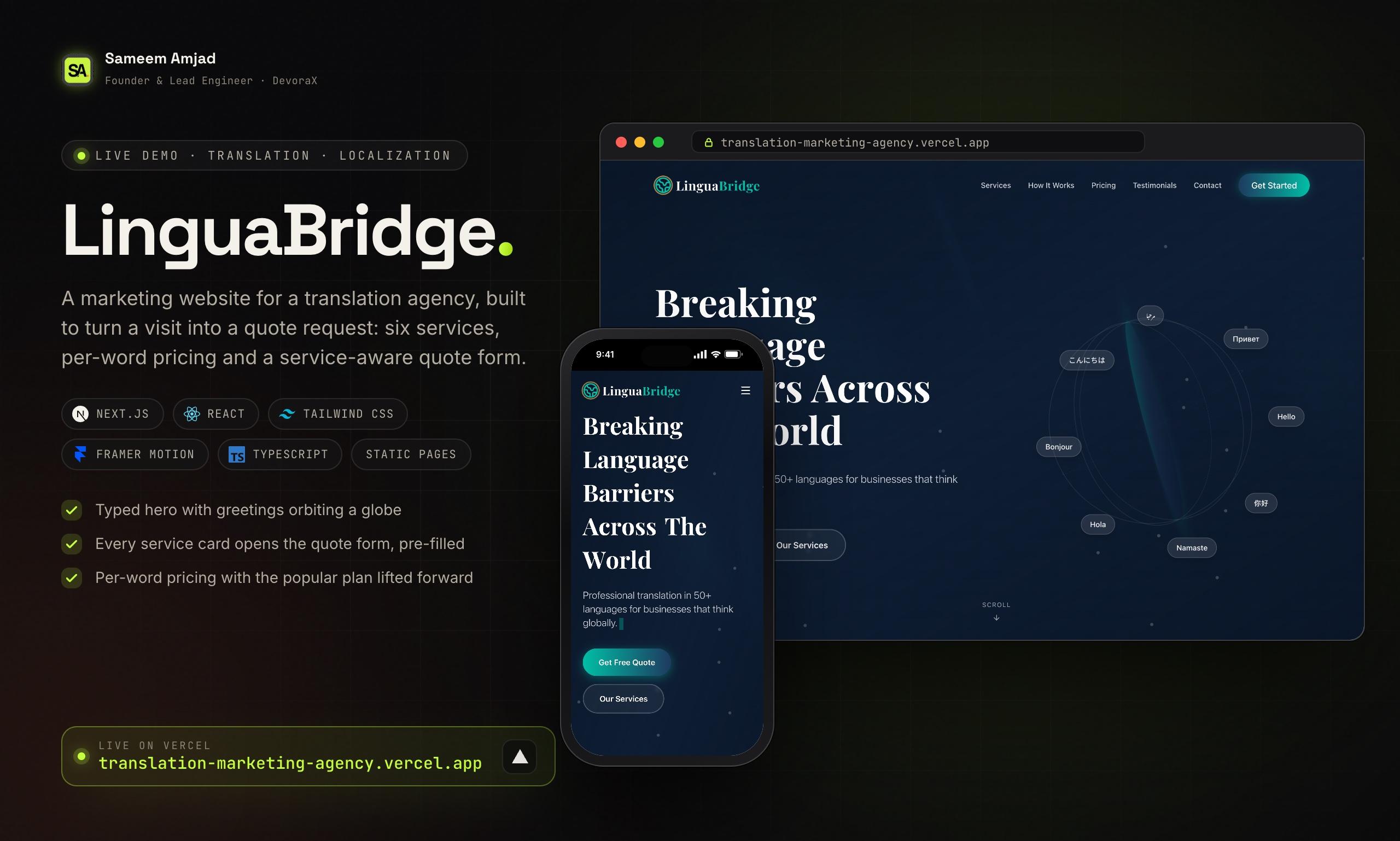
A marketing website for a translation agency, built to turn a visit into a quote request: six services, per-word pricing in plain view, and a quote form that already knows which service the visitor picked.
Facts about the build. Any figure here is shown on a public store listing or site linked on this page. See how we present portfolio work.
Walkthrough
Screens
Project Story
People buying translation compare agencies quickly and leave when the price or the next step is unclear. A brochure site that hides its pricing and makes visitors hunt for a contact form hands the request to a competitor.
A typed hero with greetings orbiting a globe and the quote one click away; six service cards, each opening the quote form with that service selected; the four-step process and per-word pricing in plain view, the popular plan lifted forward; testimonials in a marquee, counters that climb into view and a drifting language list; a quote form with language pair, service, details and file attachments, checked before it confirms; and navigation that follows the scroll, with a phone menu.
Live demo of the whole site with a 1½-minute walkthrough recorded on it: pick a service card, then fill in the quote form.
Project Details
LinguaBridge is a one-page marketing website for a translation agency working in more than fifty languages. It leads a visitor from a typed hero line, with greetings in eight languages orbiting a globe, through six services, a four-step process and per-word pricing, to a quote form. Every service card opens that form with the service already selected, and the form takes the language pair, the project details and file attachments, checking the required fields before it confirms. It is built with Next.js 16, React 19, TypeScript, Tailwind CSS and Framer Motion, and served as static pages on Vercel. On the demo the form and newsletter send nothing, and the confirmation says so; a 1½-minute walkthrough is recorded on it.
Tech Stack
Where to See It
Opens the project’s page on the demo hub in a new tab, with any logins the demo needs.
Category
Next.js & Framer MotionLinguaBridge is a marketing website for a translation agency, under the LinguaBridge brand. It is one page for people comparing agencies, taking them from the promise of translation in more than fifty languages through the services, the process and per-word pricing to a quote form. Sameem Amjad, DevoraX's founder, worked on this build. Each of the six service cards opens the form with its service already selected, the demo's plans list $0.08 and $0.12 per word plus a Custom plan, and the form takes a language pair, project details and files by browsing or drag and drop. The hero types its line out, counters animate as they come into view and the navigation follows the reader's scroll. It runs on Next.js 16, React 19, TypeScript, Tailwind CSS and Framer Motion. The demo, whose forms send nothing, is at demoprojectsforclients.sameemamjad.com/projects/linguabridge, and a 1½-minute walkthrough is on this page.
What you can check
- Live demo: demoprojectsforclients.sameemamjad.com/projects/linguabridge, which opens the one-page agency website with nothing to sign in to
- A 1½-minute walkthrough on this page, from the typed hero to a quote request with the service pre-selected and a file attached
- In the demo, a service card's Learn More scrolls to the quote form with that service already chosen in the Service Type field
Each item points to something public: a store listing, a live site or a demo build. See our terms for how we present portfolio results.
What does a translation agency's website need to do?
Someone buying translation usually arrives with a specific job, such as a contract to translate or a website to localise. They tend to compare a few agencies in one sitting, and the first questions are practical: whether the agency covers the language pair, what kind of work it takes on, what it charges and how to ask for a quote.
A brochure site that hides its prices or makes the visitor hunt for a contact form tends to lose that comparison to an agency whose page answers them in a minute.
LinguaBridge is a marketing website for a translation agency, under the LinguaBridge brand, built around that visit. One page moves from the promise of translation in more than fifty languages to six services, a four-step process and per-word pricing, and its routes end at a quote form that already knows which service the visitor picked.
How does one page lead a visitor to a quote?
The sections run in the order a buyer's questions arrive. The hero states the promise and offers two buttons, Get Free Quote and Our Services. Six service cards follow: document translation, website localisation, interpretation, media and subtitles, certified translation and business translation. How It Works then sets out four steps, from Submit Document to Quality Delivery, with a line that draws across them on a wide screen and down beside them on narrower ones.
Pricing comes next, then a marquee of testimonial cards, a band of four counters and the languages, two rows of ten drifting in opposite directions. The quote form comes last, beside the contact details, and the footer adds a newsletter signup.
The layout changes with the screen: service cards sit in one column on a phone, two on a tablet and three on a desktop, and the plans line up in three columns from tablet width.
How does a service card pre-select the quote form?
Clicking a service card, or the Learn More link on it, scrolls to the quote form with that service already chosen in the Service Type field, whose underline turns teal to show it. The five service links in the footer do the same.
Underneath, the click dispatches a browser event carrying the service's name, and the quote form listens for it. The form accepts the name only if it is one of its six service types, so a name it does not recognise never reaches the field. The event keeps the service sections and the form independent: neither needs to know where the other sits.
The visitor can still change the choice. Buttons that do not imply a service, such as Get Free Quote in the hero and the pricing buttons, scroll to the form without choosing a service.
Every extra field loses some visitors, which is why lead forms are usually kept short. Carrying forward a choice already made removes one decision.
How is per-word pricing shown?
Translation is commonly priced per word of source text, so a buyer with a word count can work out a rough cost and compare agencies on the same unit. The page shows its rates that way, up front.
The page lists three plans: Basic at $0.08 per word and Professional at $0.12 per word, as shown on the demo. Professional carries a Most Popular badge and a teal border and, on wider screens, sits slightly higher than its neighbours. Enterprise is priced as Custom and described as being for high-volume and continuous localisation, with volume discounts and translation memory among its listed features.
Agencies commonly quote large or ongoing work separately, since translation memory, a store of segments translated earlier, lets repeated text be reused and charged differently. The two priced plans have Get Started buttons and Enterprise a Contact Sales button; all of them lead to the quote form.
What does the quote form check before it confirms?
The form asks for a full name, an email address, a language pair, a service type, project details and any files. The language pair is a short list of three pairs plus Multiple / Other.
Name and email are required, and the email field is an email input, so the browser's own validation blocks an empty or malformed entry and points to the field. A spinner then shows briefly, and a second check in code trims both values and shakes the form if either is blank, which catches a name typed as spaces alone. The language pair, service and details are optional.
On a valid request the form clears, including the chosen service and the file list, and a confirmation reads "Thanks, that's everything we need", with a line saying the preview isn't connected to an inbox, so nothing was sent.
On this demo the quote form and the newsletter send and store nothing, and no request reaches anyone. The newsletter's confirmation says the preview doesn't store emails.
How do file attachments work on the quote form?
Translation requests usually come with the document itself, so the form has an attachment area. The real file input is hidden and a dashed drop zone stands in for it. Clicking the zone opens the file picker, and the zone can also be reached with the Tab key and opened with Enter or the space bar.
Files can also be dragged onto the zone, which highlights in teal while something is held over it. Each file is checked in code against the 50MB limit printed beneath the zone: anything larger is left out and the form shakes. Repeated names are listed once, the list holds up to five files, and the chosen names replace the prompt inside the zone.
On this demo the files go nowhere. The page keeps only their names to show in the list, nothing is uploaded, and the list clears when the form confirms.
How do the hero, counters and marquees move?
The hero headline appears letter by letter, each one springing up into place. Beneath it a second line types itself out after a short pause, at about 40 milliseconds a character, with a blinking teal bar as the caret. Beside it, a globe drawn with CSS 3D transforms turns slowly while eight greetings, Hola, Bonjour and Namaste among them, orbit it on a wider path from desktop width.
The counters band uses Framer Motion's useInView. Nothing counts until the band is on screen, and then each figure climbs from zero with an easing that slows near the end, once only. Most section headings and cards animate into view with whileInView, also once only.
The two marquees, testimonials and languages, are CSS keyframe loops over a repeated list, so each strip appears endless. The language rows pause while the pointer is over them, and hovering a language shows its name in that language.
How does the navigation follow the reader?
The navigation bar stays fixed at the top. It is transparent over the hero and takes on a blurred, translucent background once the page has scrolled a little. As the reader scrolls, a scroll-spy handler works out which section's top has passed a line 150 pixels from the top of the window and highlights that link in teal with an underline.
Links scroll smoothly to their section, stopping 80 pixels short so the fixed bar does not cover the heading. On screens narrower than 768 pixels the links fold into a menu button. The menu slides in from the right, the button's label switches between Open menu and Close menu for screen readers, and choosing a link closes it.
On a computer with a mouse, the pointer is replaced by a teal ring that follows it on a spring and grows over links, buttons and fields. The ring follows a mouse pointer only, so a phone or tablet never shows it, even after a tap.
Where can you see LinguaBridge?
LinguaBridge is a marketing website for a translation agency, under the LinguaBridge brand. Sameem Amjad, DevoraX's founder, worked on this build. The demo is reached from demoprojectsforclients.sameemamjad.com/projects/linguabridge and is a public website with nothing to sign in to.
Clicking a service card's Learn More shows the pre-selection at work. The quote form can be filled in, with a file attached by browsing or by dragging it onto the drop zone; it checks the required fields and confirms, but sends and stores nothing, and the confirmation says so. The newsletter works the same way. The phone number shown on the page is a placeholder.
The 1½-minute walkthrough on this page covers the typed hero, the six services, how it works, per-word pricing, testimonials and counters, the language marquee, and a quote request with the service pre-selected and a file attached.
Why this stack
- Next.js 16: the app router serves the single page. The page is all interactive React code, since nearly every section reacts to scrolling or input, yet Next.js still prerenders its HTML at build time. Decorative particles take their positions from a small seeded function instead of Math.random, so the prerendered HTML and the browser's first render agree. There are no API routes: on this demo the site has no back end.
- React 19: each section is its own component, and React state holds what changes: the chosen service, the file list, the form's status and the active navigation link. Effects attach the scroll, mouse and service-event listeners and remove them when a component unmounts, and two small custom hooks run the typewriter and the counters.
- TypeScript: props for the stat cards and form fields are typed, and the service event is read as a CustomEvent carrying a string. Because that string arrives from elsewhere on the page at run time, the form also checks it against its own list of six services, which types alone cannot guarantee.
- Tailwind CSS: utility classes keep each section's styling beside its markup, and the md: and lg: prefixes set where the services grid, the plans and the process line change shape. The brand's navy, ocean blue, teal and gold are written as exact hex values in arbitrary-value classes, with the keyframes for the globe and the marquees in plain CSS alongside.
- Framer Motion: handles the motion tied to React state or scroll position: whileInView reveals, useInView for the counters, useScroll with a spring for the reading-progress bar along the top, AnimatePresence so the phone menu can slide out before it unmounts, and the shake on a rejected form. Continuous loops such as the marquees and the globe are plain CSS animations, which browsers can usually run without JavaScript work on every frame.