Career Seal
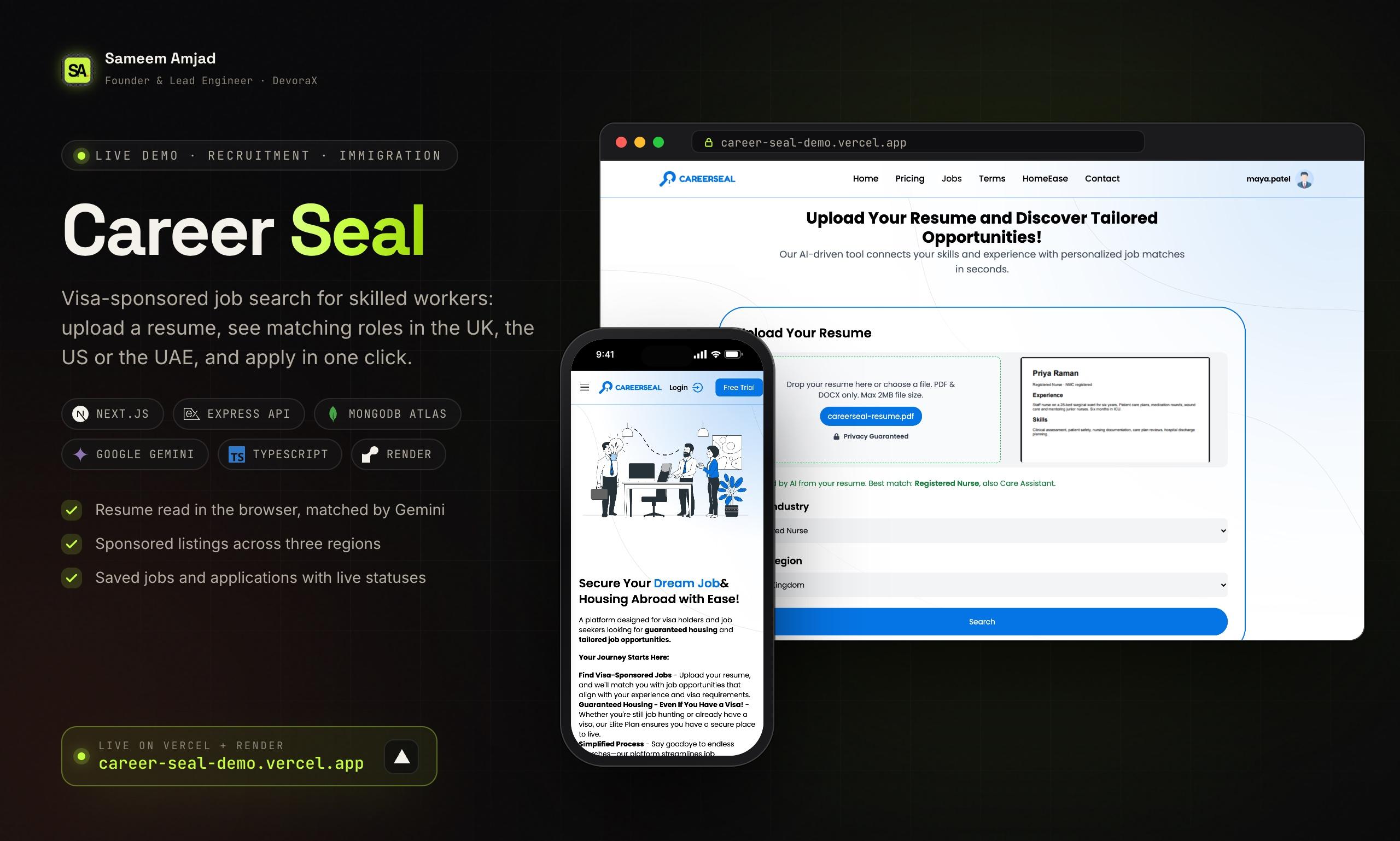
Visa-sponsored job search for skilled workers: upload a resume, see matching roles in the UK, the US or the UAE, and apply in one click, with Gemini matching resumes to job titles. Built for a DevoraX client.
Facts about the build and who it was for. Any figure here is shown on a public store listing or site linked on this page. See how we present portfolio work.
Walkthrough
Screens
Project Story
Most job boards don't say whether a role sponsors a visa, so candidates spend applications finding out. Matching a resume to the right job titles needs AI, without sending the whole file anywhere and without the cost running away.
A resume upload that reads PDF or Word files in the browser and sends only the text, with Gemini on the server suggesting job titles, keyword matching as the fallback and a daily cap on calls; sponsored listings by role and region with the visa route, salary, housing support and applicant count; saved jobs, one-click applications and an application history with each employer's status; and sign-up with a verification code, token sessions, rate limits on sign-in and AI calls, and an API open only to the site.
Live demo on 54 sample listings with a one-click member login, and a 1½-minute walkthrough recorded on it.
Project Details
Career Seal is a job search for people who need a visa to work abroad, built for a DevoraX client. Members upload a resume as a PDF or Word file; the browser reads it and sends only the text, and the server asks Gemini which of the platform's job titles it fits, falling back to keyword matching and capping calls per day. Listings are filtered by role and region (UK, US, UAE) and show the visa route, salary, housing support and applicant count. Members save jobs, apply with one click and follow each application's status. The API is Express and Mongoose on MongoDB Atlas with token sessions and rate limits, and the frontend is Next.js. The live demo runs on 54 sample listings in place of the paid job-data feed the product was built on, with checkout simulated, and a 1½-minute walkthrough is recorded on it.
Tech Stack
Where to See It
Opens the project’s page on the demo hub in a new tab, with any logins the demo needs.
Category
Next.js, Express & MongoDBCareer Seal is a job search for skilled workers who need a visa to work abroad. A member uploads a resume, sees roles in the UK, the US or the UAE whose employers sponsor a visa, saves and applies to them, and follows each application. Career Seal is a DevoraX client project: Sameem built it for a client of DevoraX. The browser reads the resume and sends only its text; the server asks Google Gemini which of the platform's job titles it fits, with keyword matching as a fallback and a daily cap on calls. The frontend is Next.js and TypeScript, and the API is Express and Mongoose on MongoDB Atlas, with token sessions and rate limits. The demo runs on 54 sample listings at demoprojectsforclients.sameemamjad.com/projects/careerseal, and a 1½-minute walkthrough is on this page.
What you can check
- Live demo: demoprojectsforclients.sameemamjad.com/projects/careerseal, with a one-click login for a demo member
- A 1½-minute walkthrough on this page: listings, a resume matched to job titles by Gemini, a search in another region, saving and applying, and the application history
- In the demo, a nurse's CV is matched to Registered Nurse in about a second, and the search switches to it
Each item points to something public: a store listing, a live site or a demo build. See our terms for how we present portfolio results.
What problem is Career Seal built to solve?
For someone who needs a visa to work in another country, most job listings leave out the one fact that decides whether applying is worth it: whether the employer will sponsor the visa. Candidates send applications, wait, and find out late that the answer was no.
Career Seal shows only roles whose employers sponsor a visa, and says how: a Skilled Worker visa in the UK, H-1B sponsorship in the US, an employment visa with an Emirates ID in the UAE. It also flags roles that help with housing on arrival, which matters to someone moving countries for the job.
The second problem is getting from a resume to a search. People describe the same work in many ways, and a search box needs one job title. Career Seal reads the resume and suggests the titles it fits, so a nurse who uploads a CV lands on nursing roles without guessing the right words.
What does a member see when they search?
After signing in, a member lands on the job search with listings for their role already loaded. Each listing shows the title, the employer, the city and country, a short description, tags for the industry and contract type, whether housing support is offered, when it was posted and how many people have applied. View Job opens the full description, the visa route, the seniority and the salary.
Two drop-downs choose the role and the region, and Search runs the query. A line above the results says what was searched, such as "6 visa-sponsored jobs for Software Engineer in United Kingdom". When nothing matches exactly, the search says so and shows other sponsored roles in that region instead of an empty page.
Listings live in MongoDB with a text index over titles, tags and descriptions, weighted towards titles, so the API can match a role by its words as well as by its exact title.
How does Gemini turn a resume into job titles?
The member drops a PDF or Word file, up to 2 MB, onto the upload card. The browser reads it there, with PDF.js for PDFs and Mammoth for Word files, shows a preview of a PDF, and sends only the extracted text to the API. The file itself never leaves the member's computer.
The server trims the text and asks Gemini to pick two to four titles from the platform's own list of roles, best match first, and to answer with a JSON array copied exactly from that list. The prompt tells the model to ignore any instructions inside the resume, and the answer is checked against the list before use, so a reply naming a role the platform doesn't have is dropped.
The suggestions appear under the upload card, with a note saying whether AI or keyword matching produced them. The role drop-down switches to the best match, and the search runs on it. In the walkthrough, a nurse's CV gives Registered Nurse, also Care Assistant.
What keeps the AI fast and its cost bounded?
Every Gemini call is made by the server with a key the browser never sees. Calls are capped at 300 a day per server, a member can ask for suggestions 15 times an hour, and each call times out after ten seconds.
If the first model fails or is slow, the server tries a second one. If both fail, or the daily cap is reached, it falls back to keyword matching: it counts the words in the resume that belong to each role and suggests the roles with the most hits. The member still gets suggestions; the note under the upload card simply says they came from the resume's skills rather than from AI.
Gemini's newer models think before answering by default. For picking titles from a fixed list that adds seconds and can use up the small output budget before the answer is written, so the request sets the thinking level to minimal. With that setting the demo's suggestions come back in about a second.
How do saving, applying and the history work?
A bookmark on each listing saves it to the member's list, and Auto Apply records an application against their account with one click. In the demo no employer is contacted, and the confirmation under the listing says so. Save and apply have separate busy states, so applying straight after saving works even on a slow connection.
The saved page lists the bookmarked roles. The history page lists every application with the date it was sent and the employer's latest status: submitted, viewed by the employer, an interview invite, or not progressed. The demo member, Maya, has three saved roles and three applications, one of them with an interview invite.
How are accounts and the API protected?
Sign-up asks for an email and a password and then a verification code; the demo sends no email, so it shows the code on screen. Passwords and verification codes are stored only as bcrypt hashes, and the user record never returns its password or reset fields to the browser. Signing in returns a token valid for seven days, signed with a secret the API refuses to start without.
The API counts requests per address or per member and refuses bursts: ten sign-ups an hour, twenty sign-in attempts every fifteen minutes, thirty searches a minute, and the AI limit above. Request bodies are cleaned of database operators before use, so a sign-in sent with a query object instead of an email is rejected. Cross-origin requests are accepted only from the site itself.
Plans start with a three-day free trial, which can be used once. Checkout for a paid plan is simulated in the demo: it creates a demo session for the member's own account and switches the plan on with nothing charged, and one account can't complete another's checkout.
Why are the frontend and API hosted separately?
The frontend is a Next.js site on Vercel. The API is a long-running Express server, which suits a host that keeps a process running, so it runs on Render, in the same US East region as the MongoDB Atlas cluster that holds the data.
Keeping them apart also keeps the Gemini key and the database credentials off the frontend host entirely. The site knows only the API's address, and the API answers only requests that come from the site's own address.
The demo's API runs on Render's free plan, which sleeps after a quiet spell, so the first request after a pause can take up to a minute while it wakes. The hub page says so.
Where can you see Career Seal?
Career Seal is a DevoraX client project: Sameem built it for a client of DevoraX. The product was built to search a paid job-data feed; the demo runs instead on 54 sample listings across the UK, the US and the UAE, from sample employers, so it costs nothing to run and every search returns realistic results. It is reached from demoprojectsforclients.sameemamjad.com/projects/careerseal.
The login page has a one-click button for the demo member, Maya, on the Pro plan, with saved roles and applications already in place. Visitors can also sign up with any email; the verification code appears on screen.
The 1½-minute walkthrough on this page shows the plans, the one-click login, sponsored listings with their details, a nurse's resume matched by Gemini, a search for the same role in the US, saving and applying, and the application history.
Why this stack
- Next.js 15 and TypeScript: one app holds the public pages (landing, pricing, terms) and the signed-in job search, saved jobs and history, which talk to the API. Typed API responses keep listing fields such as the visa route and housing support consistent across every screen.
- Express and Mongoose: a small API with one module per area (users, jobs, applications, payments and AI), each with its own routes and rate limits. Mongoose schemas define listings, members and applications and strip private fields before anything is sent.
- MongoDB Atlas: listings vary in shape by country and visa route, and a text index finds roles by the words in their titles and descriptions. Atlas runs the database as a managed cluster next to the API.
- Google Gemini: picks job titles from a fixed list, returning JSON, with minimal thinking for speed, a second model as a backup, keyword matching as the fallback and a daily cap on calls.
- JWT sessions and rate limits: a signed token keeps the API stateless across restarts, and per-route limits stop bursts of sign-ups, sign-ins, searches and AI calls.
- Vercel and Render: the site and the API are deployed separately, so the API keys and database credentials live only on the API's host.