Glorious Publications
An online bookshop for a small publisher: a catalogue in print and e-book, a page-flip preview, checkout with server-side prices and stock, and a passcode admin for books and orders. Built for a DevoraX client.
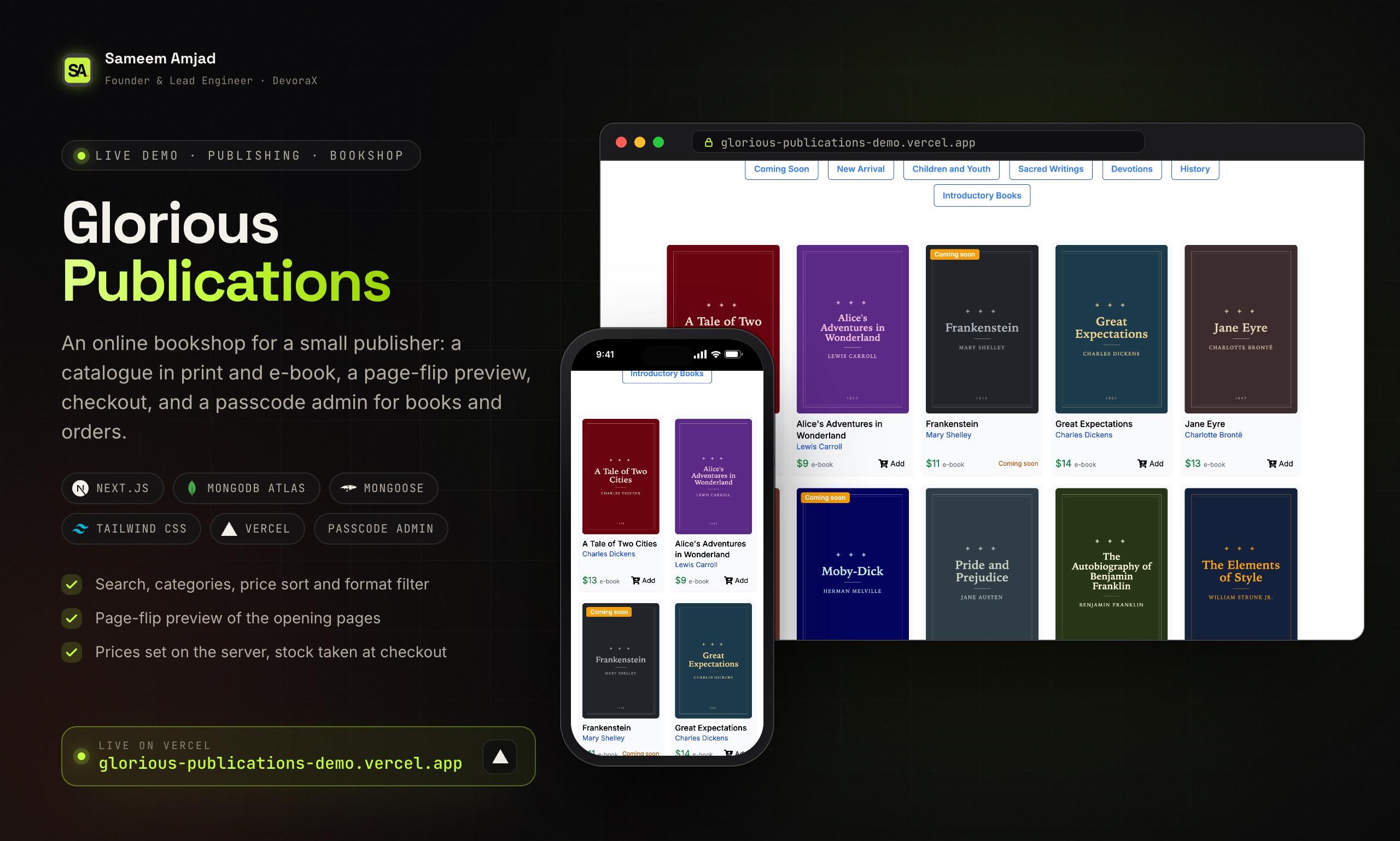
Facts about the build and who it was for. Any figure here is shown on a public store listing or site linked on this page. See how we present portfolio work.
Walkthrough
Screens
Project Story
A small publisher needs to sell printed and digital editions without a large platform. Stock for printed copies has to stay accurate, prices can't come from the browser, and someone without technical skills has to be able to add books and work through orders.
A catalogue with search by title or author, categories, price sorting and a filter for titles in print; book pages with e-book and hard-copy prices, copies left, related titles and a page-flip preview; a cart and checkout where the server prices every line and takes printed stock; and a passcode admin with sales and stock figures, low-stock alerts, best sellers, book management with the demo titles protected, and order statuses where cancelling a printed order restocks it.
Live demo on a sample catalogue of public-domain classics with a passcode admin, and a 1½-minute walkthrough recorded on it.
Project Details
Glorious Publications is an online shop for a small publisher's books, built for a DevoraX client. Readers search by title or author, browse categories, sort by price, preview the opening pages with a page-flip reader and order a hard copy or an e-book. The server prices every line and takes printed stock, refusing an order larger than the stock. The publisher's admin sits behind a passcode exchanged for a signed cookie, checked on every admin request, and shows sales and stock figures, low-stock alerts and best sellers, book management and an order list by status, where cancelling a printed order puts its copies back. It runs on Next.js and MongoDB Atlas. The live demo uses public-domain classics with covers designed for it in place of the publisher's own titles, takes no payment, and has a 1½-minute walkthrough recorded on it.
Tech Stack
Where to See It
Opens the project’s page on the demo hub in a new tab, with any logins the demo needs.
Category
Next.js & MongoDBGlorious Publications is an online bookshop for a small publisher. Readers search and browse the catalogue, turn the opening pages of a book in a page-flip preview, and order a hard copy or an e-book; the publisher adds books and works through orders in an admin. Glorious Publications is a DevoraX client project: Sameem built it for a client of DevoraX. The server prices every order line and takes printed stock, refusing an order larger than the stock, and cancelling a printed order puts its copies back. The admin sits behind a passcode exchanged for a signed, eight-hour cookie. It runs on Next.js 14 and MongoDB Atlas. The demo uses public-domain classics with covers designed for it, at demoprojectsforclients.sameemamjad.com/projects/glorious, and a 1½-minute walkthrough is on this page.
What you can check
- Live demo: demoprojectsforclients.sameemamjad.com/projects/glorious, a bookshop with thirteen public-domain classics and a passcode admin
- A 1½-minute walkthrough on this page: search and filters, a book page, the page-flip preview, an order for two titles, and the admin dashboard and orders
- In the demo, an order for more printed copies than are in stock is refused, and cancelling a printed order puts its copies back
Each item points to something public: a store listing, a live site or a demo build. See our terms for how we present portfolio results.
What does a small publisher need from an online shop?
A small publisher sells two kinds of thing from one catalogue: printed books, of which there are only so many in the storeroom, and e-books, of which there is no limit. The shop has to keep the two apart, so that the last printed copy can't be sold twice while the e-book stays on sale.
The people running it are publishers, not developers. Adding a title, correcting a price or working through the day's orders has to happen in a screen they can use without help, and the figures they care about, such as what is selling and what is about to run out, have to be in front of them when they open it.
A marketplace platform would bring fees, a look that isn't theirs and far more than they need. Glorious Publications is a single shop, built around those two jobs: selling the books, and running the shop.
How do readers find a book?
The catalogue opens on every title, each with its cover, author and price. The search box matches titles and authors as the reader types, so typing "dickens" leaves the two Dickens novels. Category buttons narrow the list, and a category with nothing in it yet says so rather than showing an empty grid.
A sort and filter panel orders the books by title, category, date or price, and a Hard Copy filter hides titles with no printed copies left, for readers who want something to hold. Titles that are coming soon stay in the catalogue with a label, so readers can see what is on the way, but can't be bought yet.
The catalogue, filters and book pages all work at phone width, where most visitors arrive.
What does a book page offer?
A book page shows the cover, the author, the description and the two formats. The e-book has a price; the hard copy costs the e-book price plus a fixed amount and shows how many copies are left, such as "3 in stock". When the printed copies run out, the hard copy can't be chosen and the e-book stays available.
Below the details, a row of other titles from the same category suggests what to read next. Every book has its own address made from its title, and links from the shop's earlier version, which passed a whole book object in the address, are redirected to the new pages so old links keep working. An address for a book that doesn't exist returns a proper not-found page.
A preview button opens the page-flip reader.
How does the page-flip preview work?
The preview shows a book's opening pages as a two-page spread that turns like paper, built with the react-pageflip library. Readers turn pages by dragging a corner or with the previous and next buttons, and the book resizes to fit the screen, down to phone width.
The point is the same as picking a book up in a shop: a reader who has read the first pages is more likely to buy, and less likely to be disappointed. The preview pages are images stored with each book, so the publisher chooses exactly how much of a book to show.
How do checkout, prices and stock stay correct?
The cart keeps each line's format and quantity, the header shows how many items are in it, and the total updates as quantities change. Checkout asks for a name, email, delivery address and postal code, and the browser checks the required fields before anything is sent.
The browser sends only which book, which format and how many. The server looks the book up, sets the price for that format, refuses an order for a title that isn't on sale, and for a hard copy takes the stock in the same database update that checks there is enough, so two orders arriving together can't both take the last copy. An order larger than the stock is refused with a message saying how many are left. The email is checked again on the server.
Each cart line becomes its own order, so the publisher can ship and track them separately. The confirmation lists every order number and, in the demo, says that no payment was taken.
What does the publisher's admin show?
The dashboard opens on four figures: books in the catalogue, printed copies in stock, orders still to handle, and revenue with cancelled orders left out. Under them sit the most recent orders, a low-stock list of titles running out, and the five best sellers by copies sold.
The books page lists every title with its prices and stock, and opens forms to add a book or edit one: title, author, description, category, e-book price, printed copies and cover images. In the demo the sample titles can't be deleted, so the catalogue stays whole for the next visitor, while books added during a visit can be.
The orders page filters by status (pending, processing, shipped, delivered and cancelled), with a count on each filter. Opening an order shows the delivery details, and its status changes from the list. Cancelling a hard-copy order puts its copies back in stock, so cancelled orders don't leave the count wrong.
How is the admin protected without user accounts?
The shop has no customer accounts and only one kind of staff user, so the admin uses a single passcode rather than a full sign-in system. The passcode is compared on the server in constant time, and a correct one is exchanged for a cookie holding an expiry time and an HMAC signature made with a server secret. The cookie is http-only, so page scripts can't read it, and it lasts eight hours.
Every admin page checks the cookie on the server and redirects to the sign-in page without it, and every admin API route checks it again before reading or changing anything, so calling the API directly doesn't get round the screens. A wrong passcode gets a plain refusal.
The demo's passcode is published on the hub page so visitors can try the admin.
Where can you see Glorious Publications?
Glorious Publications is a DevoraX client project: Sameem built it for a client of DevoraX, a small publisher. The demo replaces the publisher's own titles with thirteen public-domain classics, from Pride and Prejudice to Walden, each with a cover designed for the demo, and none of the publisher's own books is used. It is reached from demoprojectsforclients.sameemamjad.com/projects/glorious.
The shop needs no login, and checkout takes no payment. The admin passcode is on the hub page, and the ten orders already in the admin are sample data.
The 1½-minute walkthrough on this page shows the catalogue, search and filters, a book page, the page-flip preview, an order for two titles, then the admin dashboard and an order moved to processing.
Why this stack
- Next.js 14 (App Router): book pages render on the server with the title and description in the page, so search engines can read each book, and route handlers hold the order and admin APIs in the same app.
- MongoDB Atlas with Mongoose: books and orders are self-contained documents, and a single conditional update both checks and takes printed stock, so two orders can't oversell the last copy.
- react-pageflip: gives the preview pages that turn like paper, with corner dragging and previous and next buttons, sized to the screen.
- Passcode admin with a signed cookie: one shared passcode suits a shop with one kind of staff user. An HMAC-signed, http-only cookie with an expiry keeps the admin signed in for eight hours, and every admin page and API checks it on the server.
- Tailwind CSS: utility classes keep the catalogue grid, book pages and admin tables consistent and responsive down to phone width.
- Vercel: hosts the shop and its API routes together, next to the Atlas database in the US East region.